Security tips

Are Subscription Tracking Apps Safe?

Subscription trackers can save time and reduce SaaS spend, but they require access to sensitive financial data. This guide explains how these apps work, what “safe” actually means, and how to evaluate risk before connecting your accounts.

8 min. read
Subscription tracking apps illustration with app icon and large title text on a minimalist background.
No headings found in content area

TL;DR

  • Most apps are safe (with caveats)
    Reputable subscription trackers use encryption and scoped access, but they still sit on sensitive financial data and expand your attack surface.

  • “Read-only” matters
    Safe apps cannot move money or initiate payments. They only analyze transaction data through limited permissions.

  • Risk scales with access
    The more you connect, especially bank accounts and email, the more visibility the app has into your financial behavior.

  • Security signals to check
    Look for SOC 2 alignment, encryption in transit and at rest, multi-factor authentication, and clear data handling policies.

  • Biggest real risk
    The concern is rarely direct theft. It is over-collection, profiling, and how your data might be used or shared.

  • Startup takeaway
    These tools can reduce wasted spend quickly, but only make sense if you are comfortable with the level of access required.
Are Subscription Tracking Apps Safe?

Yes, most subscription tracking apps are safe when they use read-only access, strong encryption, and minimal permissions. The main risk is not money movement, but how much financial data you expose. Choose tools with clear security practices and only grant access that matches your comfort level.

How subscription tracking apps actually work

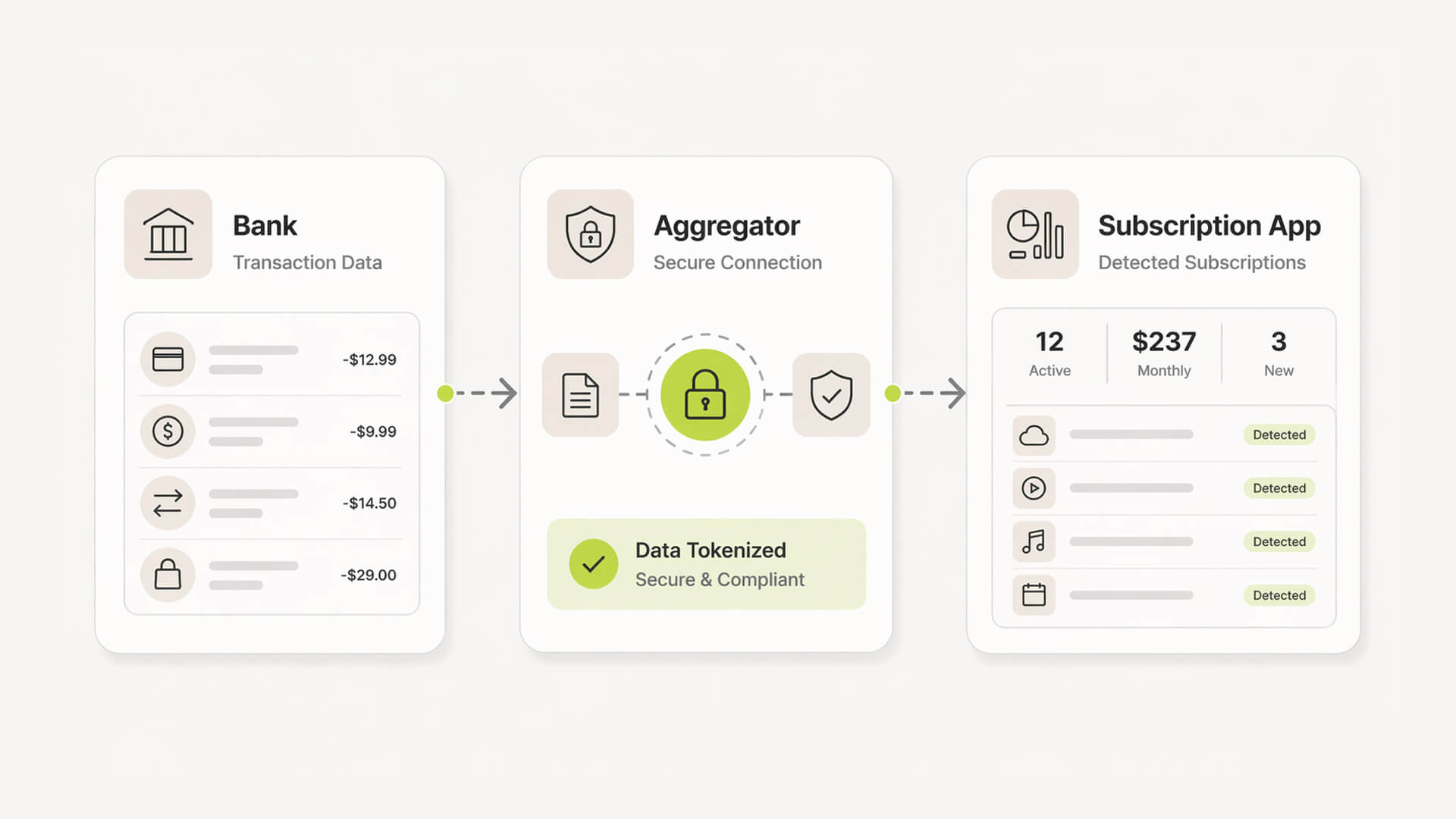
Diagram showing bank data flowing through an aggregator into a subscription tracking app.

Bank-connected apps (highest automation, highest sensitivity)

These tools connect to your bank through aggregators and analyze transaction data to detect recurring charges. They offer strong coverage with minimal setup. The trade-off is depth of access, since even read-only connections process your full financial activity.

Email & receipt scanners (middle ground)

These scan your inbox for invoices, receipts, and renewal notices. Access is usually limited to specific email scopes, but still exposes metadata about vendors and billing patterns. Coverage is solid, though less reliable than bank feeds.

Manual trackers (lowest risk, lowest automation)

You input subscriptions manually, with no external access required. This keeps exposure low, but relies on consistency and often falls out of date as tools change.

The startup contrast

Enterprise approach

  • Multiple systems and audits before connecting financial data

  • Heavy reliance on compliance frameworks and vendor reviews

  • Dedicated teams managing permissions and integrations

Startup reality

  • One person owns everything, often without security expertise

  • Speed matters more than process

  • Tools are adopted quickly, often without full visibility into data access

What “safe” actually means in financial apps

Bank-level encryption (in transit + at rest)

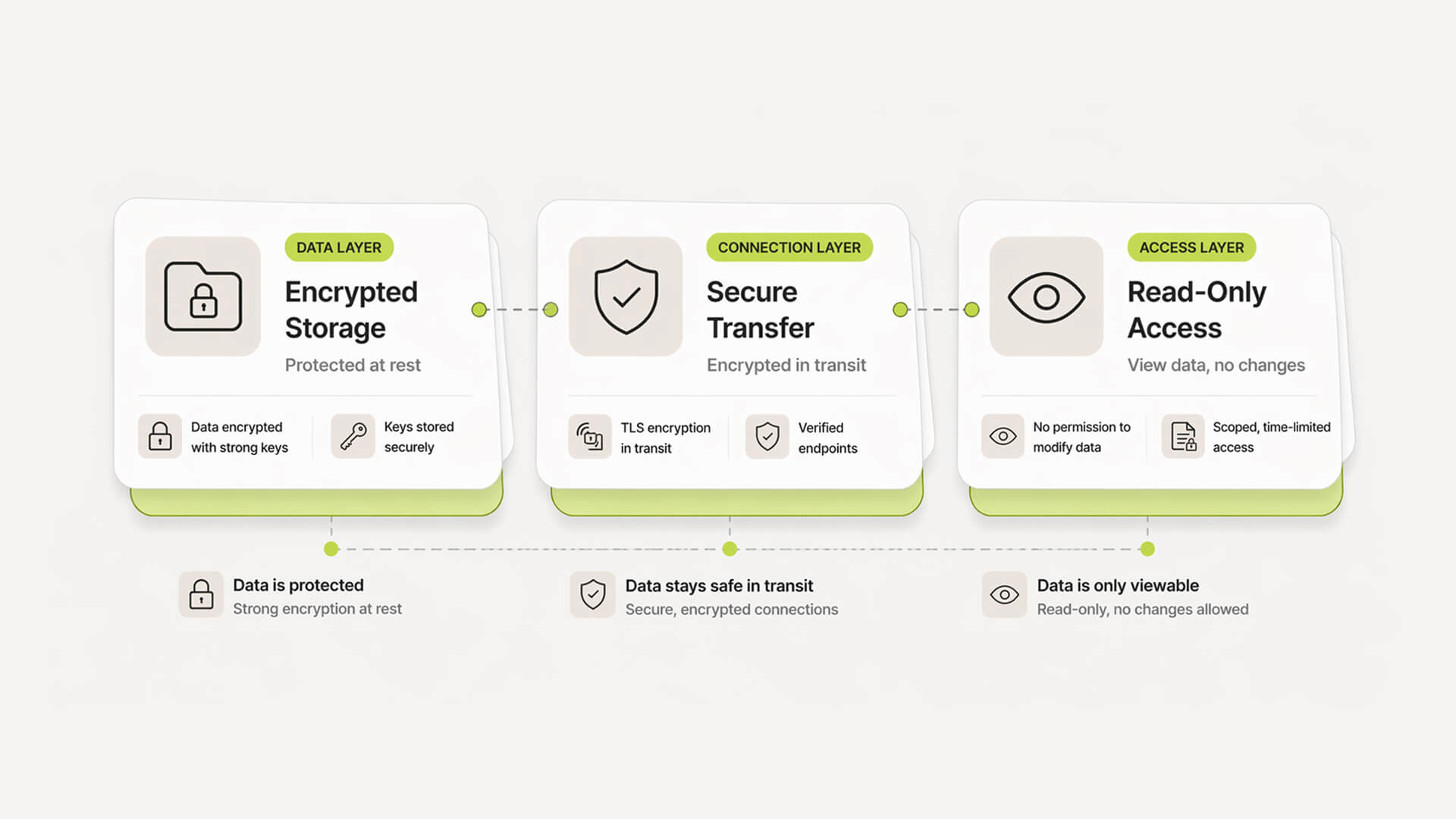
Data should be encrypted both in transit and at rest. This is a baseline requirement. If an app does not clearly state this, it is a red flag.

Layered diagram showing encryption, secure transfer, and read-only access in financial apps.

Read-only access and tokenization

Safe apps do not store your banking credentials directly. They use tokenized connections through trusted providers and request read-only access. This means no payments, transfers, or account changes.

Least-privilege permissions

Access should be limited to exactly what is needed. If an app asks for full inbox or full account access without clear justification, that is unnecessary exposure.

Authentication and account security

Multi-factor authentication, session controls, and login alerts help prevent account takeovers. These are basic controls for any finance-adjacent product.

Compliance signals (SOC 2, GDPR, etc.)

Frameworks like SOC 2 and GDPR indicate structured security practices and accountability. They do not guarantee safety, but they show the company takes security seriously.

The startup contrast

Enterprise security stack

  • Formal vendor risk assessments before adoption

  • Dedicated security teams and internal audits

  • Strict access control policies across tools

What startups actually need

  • Clear visibility into what data is accessed

  • Simple, enforced read-only permissions

  • Strong defaults without needing a security team

Is Plaid safe? (and what you’re really granting access to)

How Plaid and aggregators work

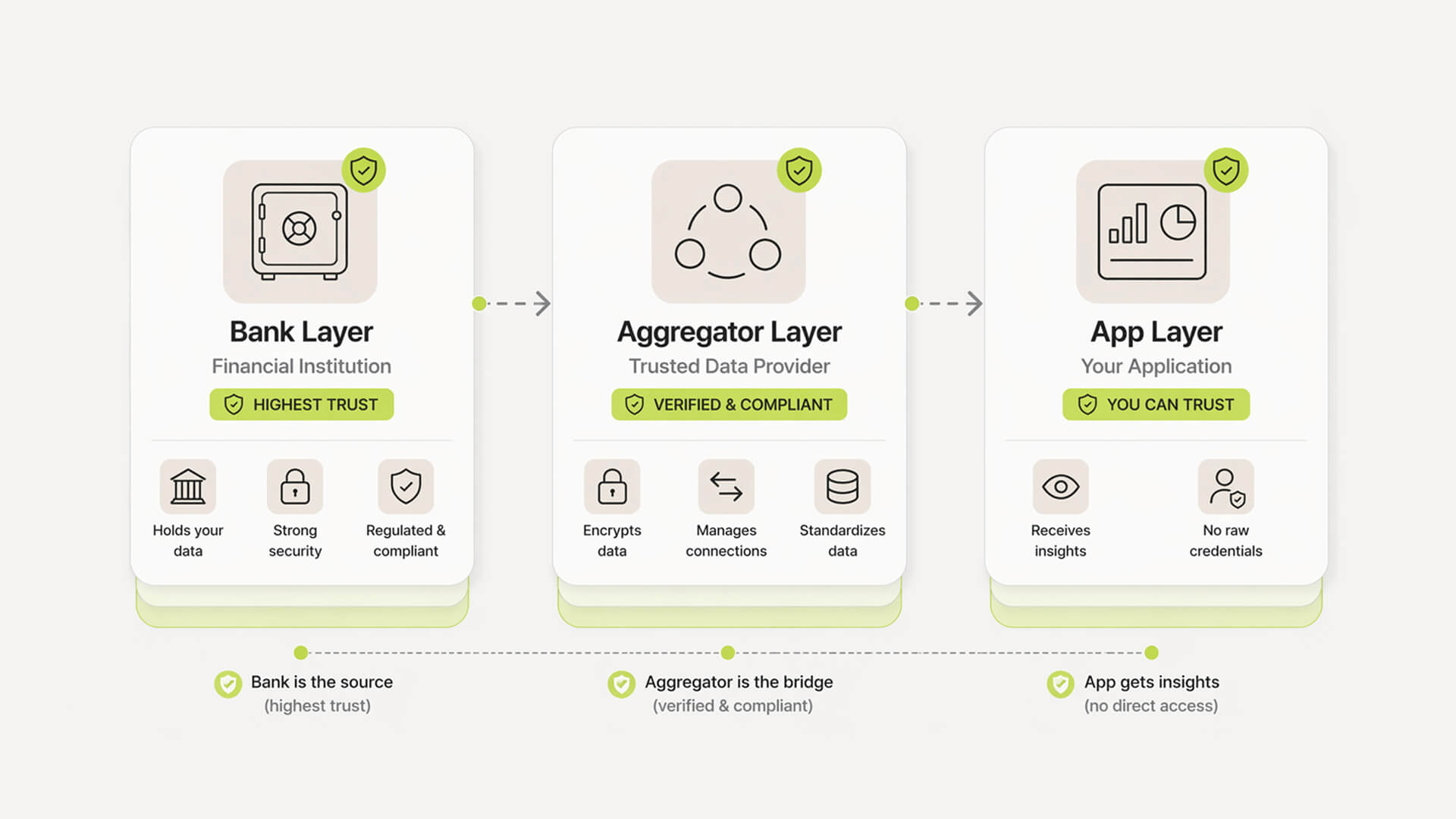
Plaid acts as a bridge between your bank and the app. Instead of sharing credentials directly, you authenticate through your bank, and Plaid provides a token that lets the app access transaction data.

What “read-only” actually means

Read-only access means the app can see transactions and balances but cannot initiate payments or move funds. It reduces financial risk, but still exposes detailed spending behavior.

Where the trust boundary sits

You are trusting three layers. Your bank, the aggregator like Plaid, and the app itself. Each layer processes your data, which expands the surface area where things can go wrong.

Stacked diagram showing bank, aggregator, and app trust layers in financial data access.

The startup contrast

Enterprise interpretation

  • Full vendor due diligence before approving Plaid

  • Legal and security teams reviewing data flows

  • Strict internal policies on financial integrations

Founder-level reality

  • Trust is based on reputation and speed

  • Limited time to evaluate data handling deeply

  • Decision is often ROI first, security second

The real risks no one explains clearly

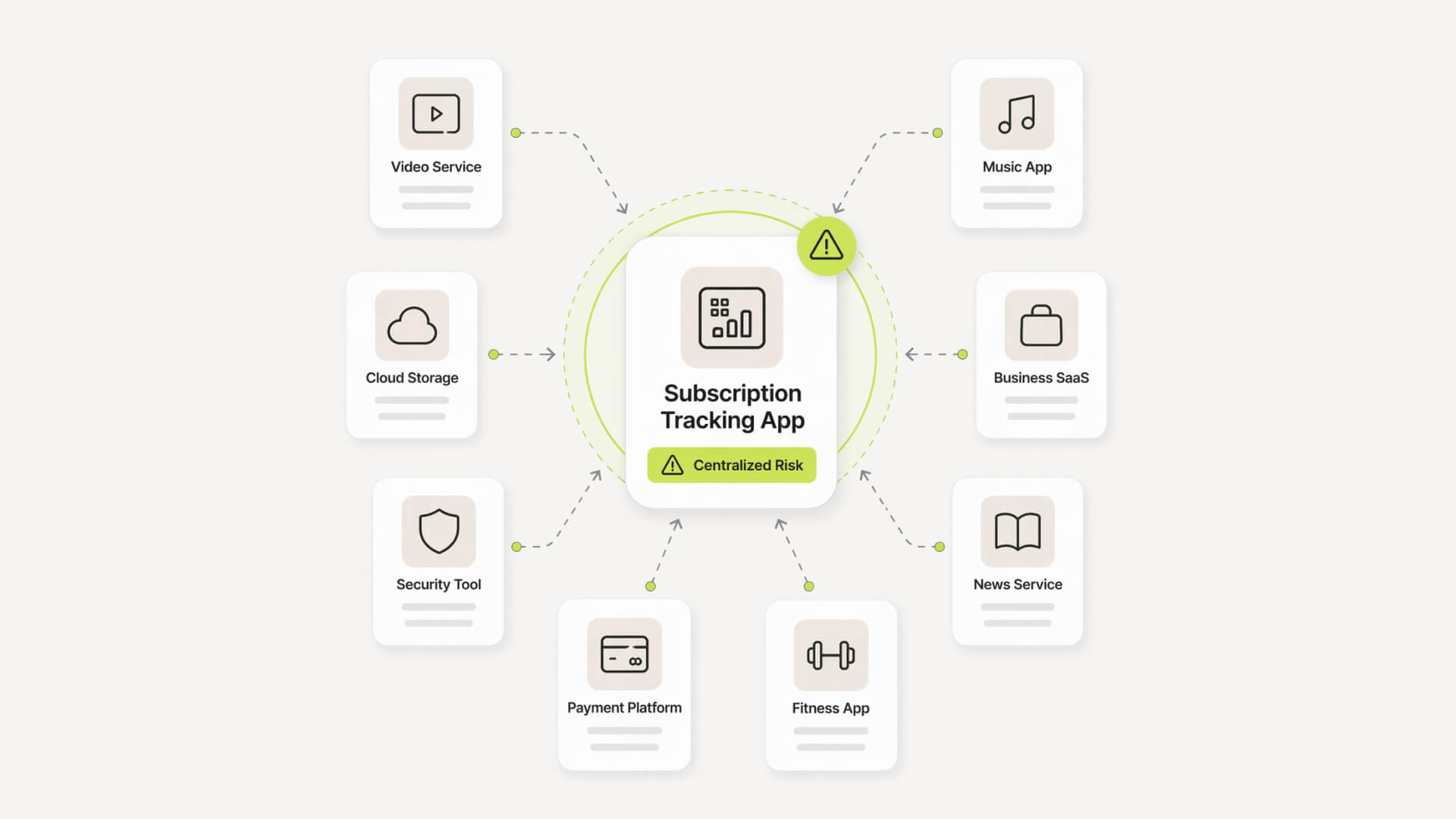
Diagram showing a central app connected to multiple subscriptions illustrating centralized data risk.

Data breaches and aggregated exposure

These tools centralize your financial footprint. If compromised, they do not just expose one subscription, they expose your entire spend landscape. Even without card numbers, transaction history reveals vendors, tools, and internal operations.

Are Subscription Tracking Apps Safe?

Yes, most subscription tracking apps are safe when they use read-only access, strong encryption, and minimal permissions. The main risk is not money movement, but how much financial data you expose. Choose tools with clear security practices and only grant access that matches your comfort level.

How subscription tracking apps actually work

Diagram showing bank data flowing through an aggregator into a subscription tracking app.

Bank-connected apps (highest automation, highest sensitivity)

These tools connect to your bank through aggregators and analyze transaction data to detect recurring charges. They offer strong coverage with minimal setup. The trade-off is depth of access, since even read-only connections process your full financial activity.

Email & receipt scanners (middle ground)

These scan your inbox for invoices, receipts, and renewal notices. Access is usually limited to specific email scopes, but still exposes metadata about vendors and billing patterns. Coverage is solid, though less reliable than bank feeds.

Manual trackers (lowest risk, lowest automation)

You input subscriptions manually, with no external access required. This keeps exposure low, but relies on consistency and often falls out of date as tools change.

The startup contrast

Enterprise approach

  • Multiple systems and audits before connecting financial data

  • Heavy reliance on compliance frameworks and vendor reviews

  • Dedicated teams managing permissions and integrations

Startup reality

  • One person owns everything, often without security expertise

  • Speed matters more than process

  • Tools are adopted quickly, often without full visibility into data access

What “safe” actually means in financial apps

Bank-level encryption (in transit + at rest)

Data should be encrypted both in transit and at rest. This is a baseline requirement. If an app does not clearly state this, it is a red flag.

Layered diagram showing encryption, secure transfer, and read-only access in financial apps.

Read-only access and tokenization

Safe apps do not store your banking credentials directly. They use tokenized connections through trusted providers and request read-only access. This means no payments, transfers, or account changes.

Least-privilege permissions

Access should be limited to exactly what is needed. If an app asks for full inbox or full account access without clear justification, that is unnecessary exposure.

Authentication and account security

Multi-factor authentication, session controls, and login alerts help prevent account takeovers. These are basic controls for any finance-adjacent product.

Compliance signals (SOC 2, GDPR, etc.)

Frameworks like SOC 2 and GDPR indicate structured security practices and accountability. They do not guarantee safety, but they show the company takes security seriously.

The startup contrast

Enterprise security stack

  • Formal vendor risk assessments before adoption

  • Dedicated security teams and internal audits

  • Strict access control policies across tools

What startups actually need

  • Clear visibility into what data is accessed

  • Simple, enforced read-only permissions

  • Strong defaults without needing a security team

Is Plaid safe? (and what you’re really granting access to)

How Plaid and aggregators work

Plaid acts as a bridge between your bank and the app. Instead of sharing credentials directly, you authenticate through your bank, and Plaid provides a token that lets the app access transaction data.

What “read-only” actually means

Read-only access means the app can see transactions and balances but cannot initiate payments or move funds. It reduces financial risk, but still exposes detailed spending behavior.

Where the trust boundary sits

You are trusting three layers. Your bank, the aggregator like Plaid, and the app itself. Each layer processes your data, which expands the surface area where things can go wrong.

Stacked diagram showing bank, aggregator, and app trust layers in financial data access.

The startup contrast

Enterprise interpretation

  • Full vendor due diligence before approving Plaid

  • Legal and security teams reviewing data flows

  • Strict internal policies on financial integrations

Founder-level reality

  • Trust is based on reputation and speed

  • Limited time to evaluate data handling deeply

  • Decision is often ROI first, security second

The real risks no one explains clearly

Diagram showing a central app connected to multiple subscriptions illustrating centralized data risk.

Data breaches and aggregated exposure

These tools centralize your financial footprint. If compromised, they do not just expose one subscription, they expose your entire spend landscape. Even without card numbers, transaction history reveals vendors, tools, and internal operations.

Track your SaaS spend

Get full visibility into subscriptions, owners, and upcoming renewals.

Join 100+ founders in line

Over-collection and data monetization

Some apps collect more than necessary, including spending patterns, vendor frequency, and inferred business behavior. This data can be used for analytics, sold, or shared with partners. The risk is not always obvious at signup.

Third-party SDK risk

Most apps rely on external services for analytics, notifications, or payments. Each integration adds another layer of exposure. You are trusting not just one company, but an entire ecosystem.

Shadow IT visibility risk (ironically)

The tool meant to give you visibility also becomes a map of your stack. If accessed, it shows exactly what tools you use, how often, and where money flows.

Single point of failure

Instead of being spread across banks and inboxes, your data is centralized in one place. That convenience is useful, but it also concentrates risk in a single account.

Privacy vs automation: the trade-off spectrum

Manual tracking vs app-based tracking

Approach

Data exposure

Effort required

Reliability

Manual (spreadsheet)

Very low

High

Low–medium

App-based (connected)

Medium–high

Low

High

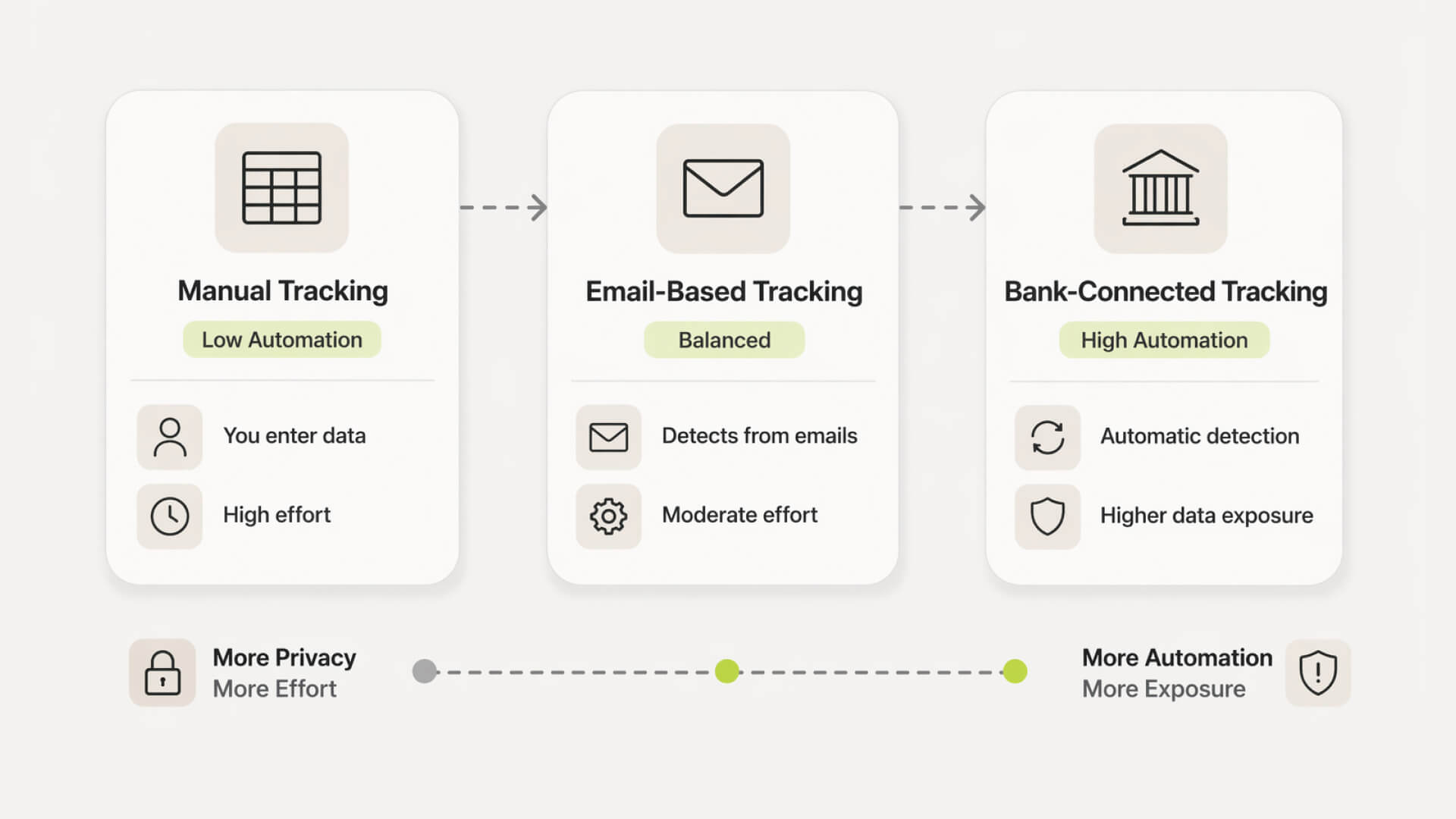
Manual tracking keeps data local but breaks quickly as tools scale. App-based tracking reduces effort but requires sharing financial signals.

Email vs bank integrations

Integration type

Data access scope

Coverage

Sensitivity

Email scanning

Receipts, invoices

Partial

Medium

Bank connection

Full transaction history

Near-complete

High

Email gives context. Bank data gives completeness.

Risk vs convenience breakdown

Higher automation reduces manual work and missed subscriptions, but increases data exposure. The goal is not all or nothing. It is choosing the minimum access needed for reliable visibility.

Horizontal scale showing manual tracking, email tracking, and bank-connected apps by privacy and automation level.

Over-collection and data monetization

Some apps collect more than necessary, including spending patterns, vendor frequency, and inferred business behavior. This data can be used for analytics, sold, or shared with partners. The risk is not always obvious at signup.

Third-party SDK risk

Most apps rely on external services for analytics, notifications, or payments. Each integration adds another layer of exposure. You are trusting not just one company, but an entire ecosystem.

Shadow IT visibility risk (ironically)

The tool meant to give you visibility also becomes a map of your stack. If accessed, it shows exactly what tools you use, how often, and where money flows.

Single point of failure

Instead of being spread across banks and inboxes, your data is centralized in one place. That convenience is useful, but it also concentrates risk in a single account.

Privacy vs automation: the trade-off spectrum

Manual tracking vs app-based tracking

Approach

Data exposure

Effort required

Reliability

Manual (spreadsheet)

Very low

High

Low–medium

App-based (connected)

Medium–high

Low

High

Manual tracking keeps data local but breaks quickly as tools scale. App-based tracking reduces effort but requires sharing financial signals.

Email vs bank integrations

Integration type

Data access scope

Coverage

Sensitivity

Email scanning

Receipts, invoices

Partial

Medium

Bank connection

Full transaction history

Near-complete

High

Email gives context. Bank data gives completeness.

Risk vs convenience breakdown

Higher automation reduces manual work and missed subscriptions, but increases data exposure. The goal is not all or nothing. It is choosing the minimum access needed for reliable visibility.

Horizontal scale showing manual tracking, email tracking, and bank-connected apps by privacy and automation level.

Still tracking this manually?

Subsight automatically maps your tools, owners, and renewal timelines in one place.

Join 100+ founders in line

How to choose a safe subscription tracker (checklist)

Business model transparency

  • Clear pricing model, not “free” without explanation

  • Revenue comes from subscriptions, not data resale

  • No vague claims about “partner insights” or analytics monetization

Privacy policy red flags

  • Broad language like “may share with partners”

  • No clear data retention timelines

  • No mention of deletion or user control

  • Hard to understand or overly generic policies

Security features to verify

  • Encryption in transit and at rest

  • Read-only financial connections

  • Multi-factor authentication support

  • Public mention of SOC 2 or similar frameworks

Permission scope evaluation

  • Only asks for access needed to function

  • Optional integrations, not forced connections

  • Clear explanation of what each permission does

  • Ability to disconnect accounts easily

Exit and data deletion controls

  • Export your data without friction

  • Delete account without contacting support

  • Clear confirmation of data removal

  • No hidden retention after account closure

Pro Tip: If you are unsure about a tool, start in manual mode or connect a secondary account first. This lets you validate accuracy and behavior before exposing your full financial data. Treat access as something you earn over time, not something you grant upfront.

Why we built Subsight: the subscription tracking trust gap

The old way: blind trust in black-box tools

Most tools ask for access first and explain later. You connect your bank or inbox, and the system starts pulling data without showing exactly what is being accessed or how it is used.

The problem: no visibility into what’s actually shared

For founders, this creates a gap. You gain spend visibility but lose clarity on data exposure. Basic questions become hard to answer, like what is stored, who can access it, and where it flows.

The insight: founders want control, not complexity

Early-stage teams do not need enterprise security workflows. They need clear boundaries, minimal permissions, and predictable behavior. The goal is not more data. It is just enough visibility to control spend without introducing unnecessary risk.

The Subsight shortcut

Skip manual audits and spreadsheets

Instead of reconciling transactions line by line, Subsight surfaces subscriptions automatically from read-only data. No need to maintain separate trackers or chase receipts across tools.

Automatic subscription detection (without overreach)

Detection is scoped to recurring patterns, not full behavioral profiling. You get visibility into subscriptions without exposing unnecessary financial context.

Owner assignment without extra permissions

Assign responsibility to team members without connecting additional systems. No HR integrations or invasive access required. Keeps accountability simple and contained.

Renewal alerts without inbox access

Stay ahead of renewals without scanning your email. Alerts are based on detected billing cycles, not inbox scraping.

Practical security tips for founders (quick wins)

Account hygiene basics

  • Use a password manager and unique passwords for every finance tool

  • Enable multi-factor authentication wherever available

  • Avoid shared logins across team members

  • Revoke access for former employees immediately

Permission minimization

  • Start with the lowest access level and expand only if needed

  • Avoid connecting both bank and email unless necessary

  • Review connected accounts regularly and remove unused ones

  • Be cautious with tools that require full inbox or device access

Monitoring and alerts

  • Turn on login and activity alerts inside the app

  • Check bank and card statements weekly, not monthly

  • Set renewal alerts for high-cost subscriptions

  • Investigate unfamiliar vendors or unexpected charges quickly

Take control of your SaaS stack

Stop guessing. Know exactly what you’re paying for and who owns it.

Join 100+ founders in line

Frequently asked questions

Is Plaid safe to connect to my bank?

Can subscription apps access or move my money?

Is manual tracking safer than using an app?

What happens if a subscription app gets hacked?

Do free subscription apps sell my data?

No headings found in content area

Find hidden SaaS subscriptions

Track every tool, owner, and renewal in one place. No spreadsheets. No surprise renewals.

Join 100+ founders in line

Professional portrait of Petras Nargela, Founder of Subsight, against a neutral background.

Petras Nargela

Petras is the Founder of Subsight and a veteran entrepreneur with over 10+ years of experience building and scaling digital ventures. Over the past decade, he has co-founded several successful companies that generate 7-figure annual revenue, including a Shopify app studio and a digital agency. Having managed the complex financial stacks of multiple high-growth businesses, he built Subsight to solve the "SaaS leakage" problem he experienced firsthand. He now helps B2B teams turn software chaos into a strategic, automated advantage.

Get started

Affordable subscription tracking for teams

Track, manage, and cancel subscriptions in minutes. Join the waitlist today to secure 40% off your first 3 months.

Get started

Affordable subscription tracking for teams

Track, manage, and cancel subscriptions in minutes. Join the waitlist today to secure 40% off your first 3 months.

Get started

Affordable subscription tracking for teams

Track, manage, and cancel subscriptions in minutes. Join the waitlist today to secure 40% off your first 3 months.