SaaS audits

How to Audit Your SaaS Cost Stack in Under 2 Hours

This guide walks through a fast, structured way to audit your SaaS spend without complex tools or long processes. It is designed for founders and ops leads who need quick visibility and immediate cost savings.

6 min. read
Blog thumbnail image displaying the title “SaaS Cost Audit Checklist" with a list icon on a light background.
No headings found in content area

TL;DR: Audit your SaaS cost stack in 2 hours

  • Time-boxed sprint
    Run this as a strict 2-hour session. Split it into discovery, analysis, and action. Focus on exposing obvious waste that is quietly inflating burn.

  • Centralized visibility
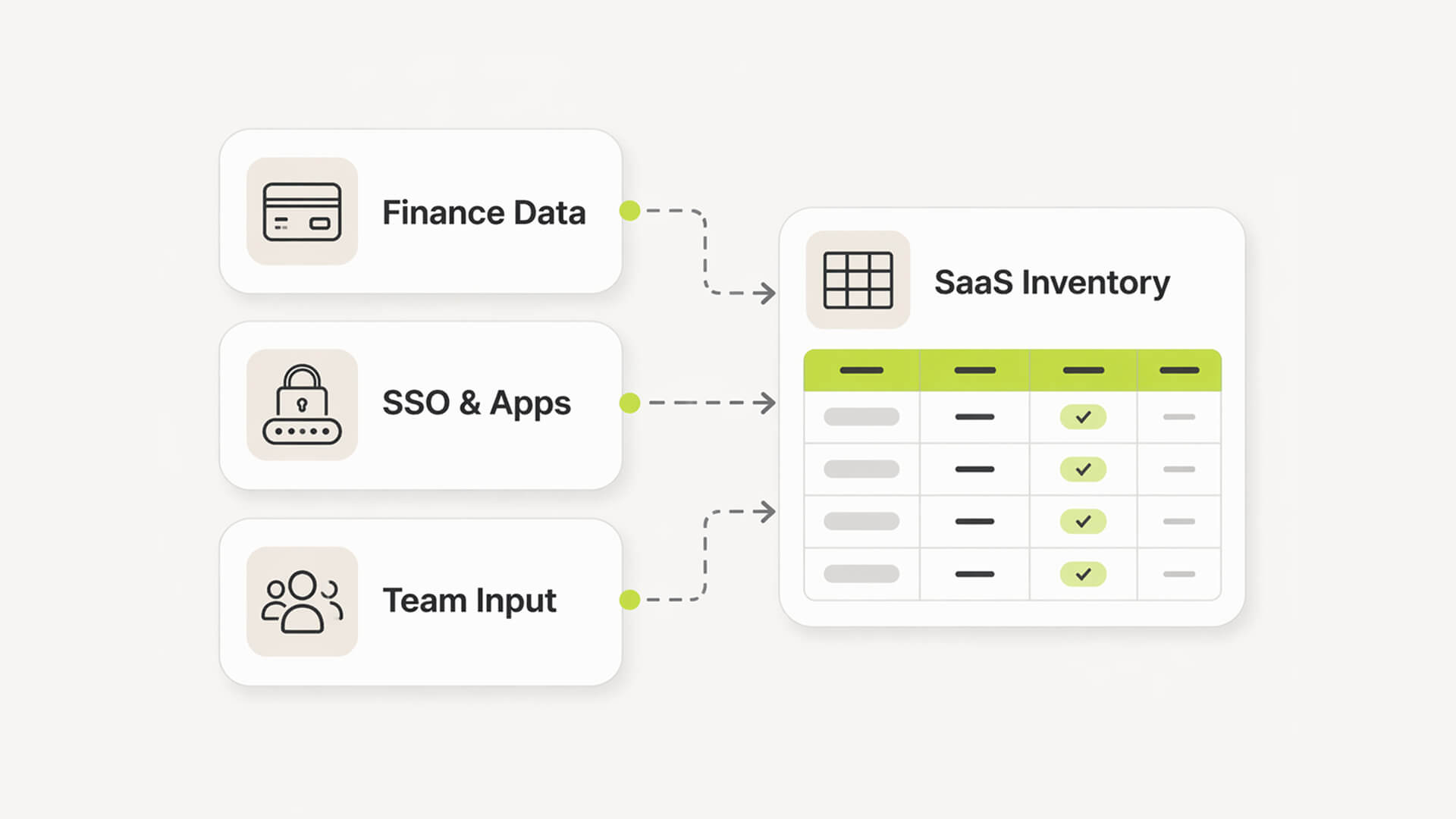
    Pull three inputs: finance data, SSO/app access, and quick team input. This gets you close to a complete inventory without chasing edge cases.

  • Immediate cost wins
    Focus on what is easy to fix today. Unused seats. Duplicate tools. Plans that are clearly overkill for actual usage. These are the fastest savings.

  • Action over analysis
    Do not leave decisions hanging. Every flagged tool gets an owner and a next step before the session ends. Otherwise nothing changes.

  • Automate going forward
    Manual tracking breaks within weeks. Use something like Subsight to sync data once and keep visibility without rebuilding this spreadsheet again.
Can you audit your SaaS costs in under 2 hours?

Yes. You can audit your SaaS costs in under 2 hours by time-boxing discovery, usage analysis, and decisions. Pull data from finance and SSO, flag unused or duplicate tools, and assign clear actions. It will not be perfect, but it will surface most wasted spend quickly.

Why we built Subsight: The SaaS cost audit gap

The old way: spreadsheets, guesswork, and missed renewals

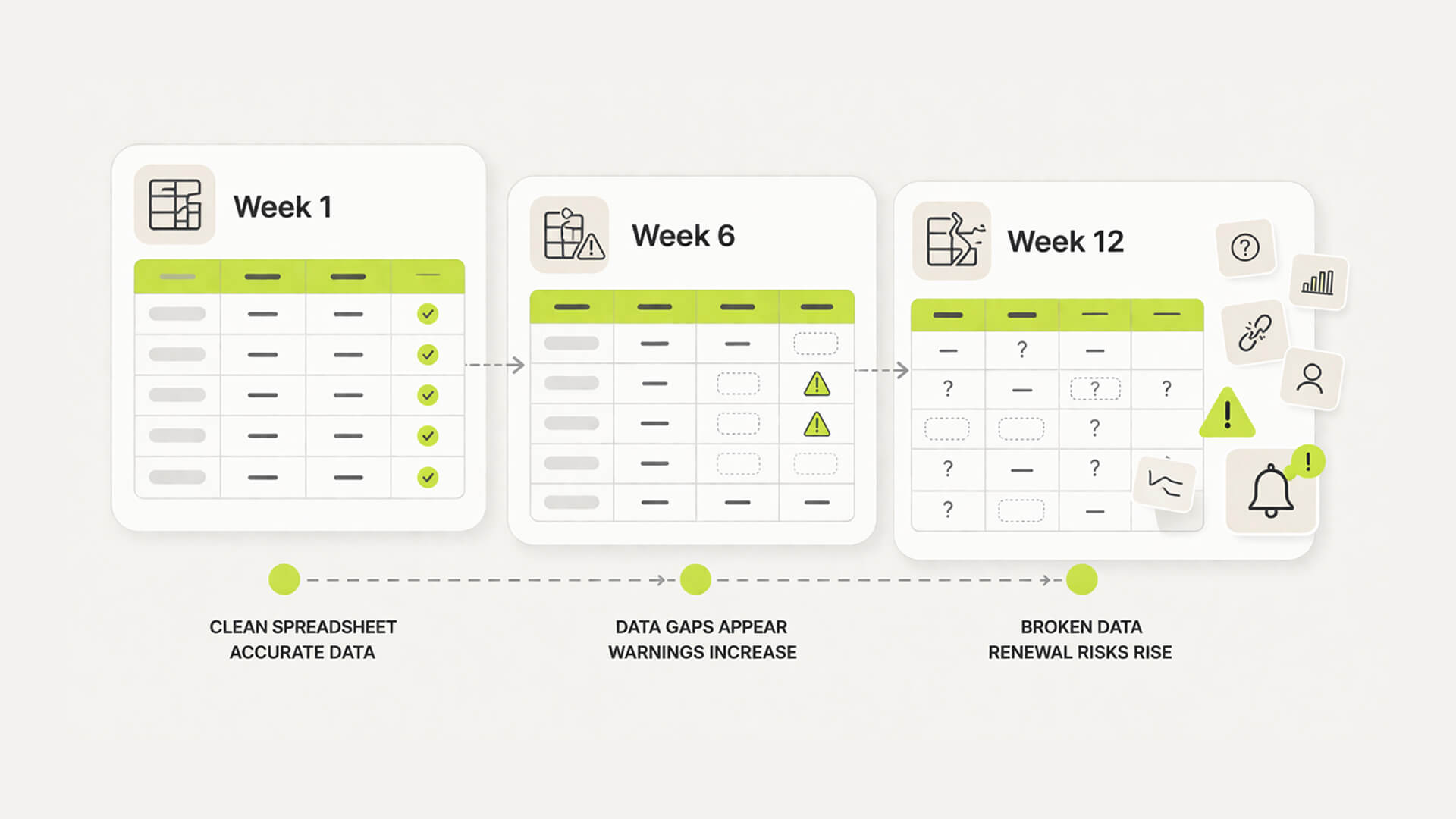
Most teams start with a spreadsheet. It works for a week. Then it drifts. Cards change, tools get added, owners forget to update rows. Renewal dates sit buried until invoices hit. By the time you look again, the data is already stale.

Three-stage diagram showing a spreadsheet becoming outdated and fragmented over time.

The problem: burn rate creep and invisible “shadow IT”

Costs rarely spike. They accumulate. A few extra seats here, a forgotten tool there. Add in tools bought on personal cards or outside finance, and you lose visibility. This is where burn quietly expands, as highlighted in startup SaaS waste statistics.

The shift: from manual tracking to automated discovery

The fix is not more discipline. It is better inputs. Automated discovery pulls data from where it actually lives, so your stack reflects reality without constant updates, a core principle behind what is SaaS management.

Can you audit your SaaS costs in under 2 hours?

Yes. You can audit your SaaS costs in under 2 hours by time-boxing discovery, usage analysis, and decisions. Pull data from finance and SSO, flag unused or duplicate tools, and assign clear actions. It will not be perfect, but it will surface most wasted spend quickly.

Why we built Subsight: The SaaS cost audit gap

The old way: spreadsheets, guesswork, and missed renewals

Most teams start with a spreadsheet. It works for a week. Then it drifts. Cards change, tools get added, owners forget to update rows. Renewal dates sit buried until invoices hit. By the time you look again, the data is already stale.

Three-stage diagram showing a spreadsheet becoming outdated and fragmented over time.

The problem: burn rate creep and invisible “shadow IT”

Costs rarely spike. They accumulate. A few extra seats here, a forgotten tool there. Add in tools bought on personal cards or outside finance, and you lose visibility. This is where burn quietly expands, as highlighted in startup SaaS waste statistics.

The shift: from manual tracking to automated discovery

The fix is not more discipline. It is better inputs. Automated discovery pulls data from where it actually lives, so your stack reflects reality without constant updates, a core principle behind what is SaaS management.

Understand your spend flow

See how modern teams structure approvals, budgets, and visibility.

Join 100+ founders in line

The 2-hour SaaS cost audit sprint (saas cost audit checklist)

This approach aligns with common frameworks found in SaaS stack audit guides and broader SaaS optimization checklists.

Phase 1: Discover your entire SaaS stack (30 minutes)

Three data sources feeding into a central SaaS inventory system.

Pull financial records

  • Export last 3–12 months of transactions from corporate cards and accounting tools

  • Filter for recurring charges and recognizable SaaS vendors

  • Flag anything that looks like a subscription

  • Normalize monthly cost for annual payments

Check SSO and admin consoles

  • Review connected apps in Google Workspace, Microsoft 365, Okta, or similar

  • Export user and license data from key tools

  • Note apps missing from financial data

  • Flag invoice-based tools billed outside cards

Ask team leads for hidden tools

  • Request a list of tools used daily, weekly, or monthly

  • Ask specifically about trials that converted to paid

  • Check for tools paid on personal cards

  • Capture rough user counts per tool

Build a quick SaaS inventory template

  • Tool name and vendor

  • Owner or team

  • Billing frequency and monthly cost

  • Licenses purchased

  • Renewal date

  • Notes for follow-up

The startup contrast

  • Enterprise: Weeks of procurement audits

  • Startup: 30-minute rough inventory that gets you 80% there

Phase 2: Analyze usage and waste (45 minutes)

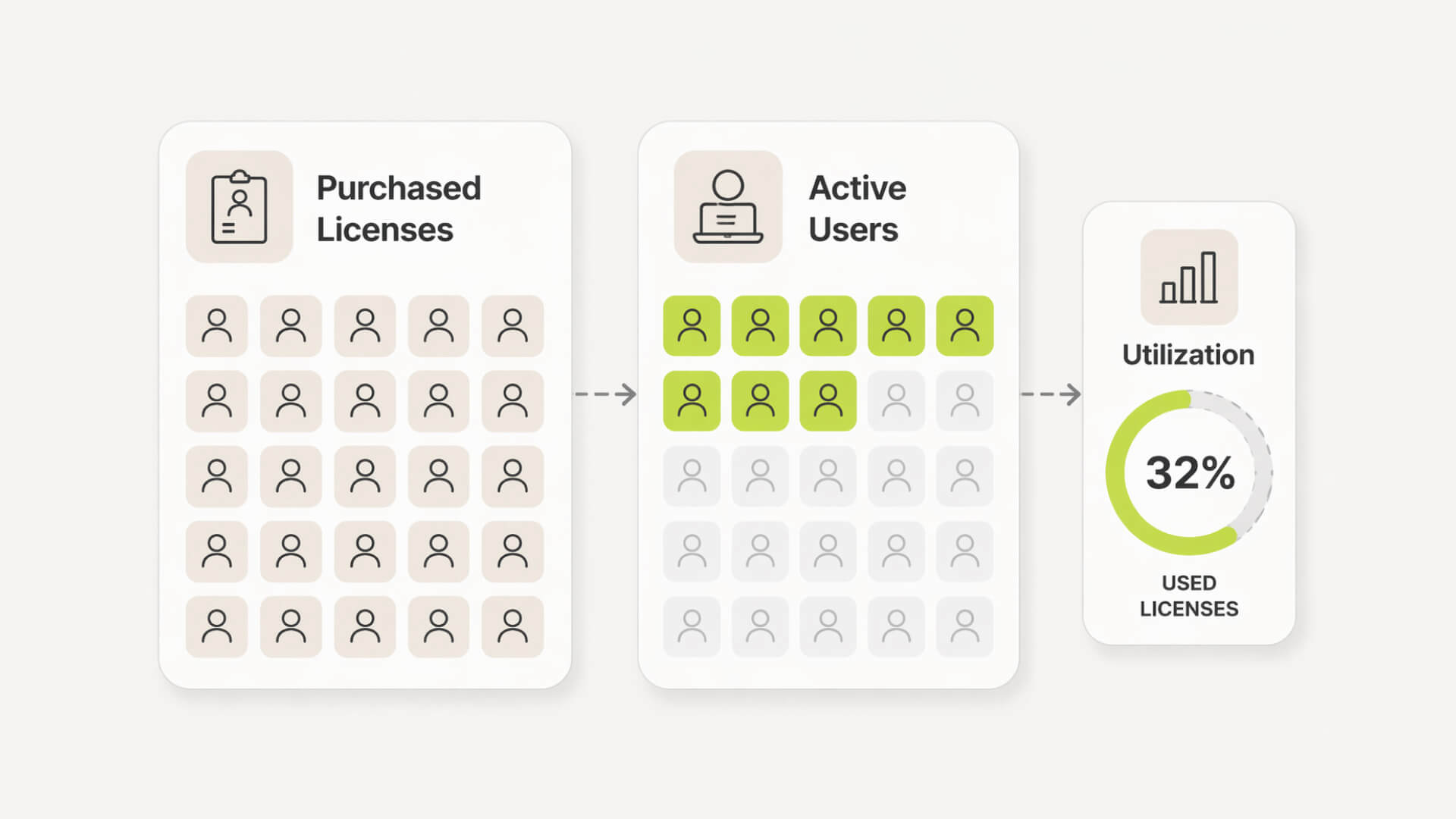
Comparison showing purchased licenses versus actively used accounts.

Audit software licenses and usage

  • Compare licenses purchased vs assigned

  • Check last login or activity data

  • Identify plan tiers across users

  • Calculate basic utilization ratio

How to find unused subscriptions

  • Flag unassigned licenses

  • Identify users inactive for 60–90 days

  • Look for tools with no clear owner

  • Highlight low-cost tools that accumulate over time, similar to patterns described in how to find hidden monthly subscriptions.

Identify redundant tools and overlaps

  • Group tools by category

  • Spot duplicate functionality across teams

  • Check which tool has highest adoption

  • Mark consolidation candidates

Score business value vs cost

SaaS waste signals

Signal

What it means

Action

Low utilization

Too many unused seats

Reduce licenses

Inactive users

No recent activity

Reclaim access

Tool overlap

Multiple tools same function

Consolidate

No owner

No accountability

Assign or cut

The startup contrast

  • Enterprise: Complex ITAM tools and reports

  • Startup: Simple utilization ratios and quick flags

The 2-hour SaaS cost audit sprint (saas cost audit checklist)

This approach aligns with common frameworks found in SaaS stack audit guides and broader SaaS optimization checklists.

Phase 1: Discover your entire SaaS stack (30 minutes)

Three data sources feeding into a central SaaS inventory system.

Pull financial records

  • Export last 3–12 months of transactions from corporate cards and accounting tools

  • Filter for recurring charges and recognizable SaaS vendors

  • Flag anything that looks like a subscription

  • Normalize monthly cost for annual payments

Check SSO and admin consoles

  • Review connected apps in Google Workspace, Microsoft 365, Okta, or similar

  • Export user and license data from key tools

  • Note apps missing from financial data

  • Flag invoice-based tools billed outside cards

Ask team leads for hidden tools

  • Request a list of tools used daily, weekly, or monthly

  • Ask specifically about trials that converted to paid

  • Check for tools paid on personal cards

  • Capture rough user counts per tool

Build a quick SaaS inventory template

  • Tool name and vendor

  • Owner or team

  • Billing frequency and monthly cost

  • Licenses purchased

  • Renewal date

  • Notes for follow-up

The startup contrast

  • Enterprise: Weeks of procurement audits

  • Startup: 30-minute rough inventory that gets you 80% there

Phase 2: Analyze usage and waste (45 minutes)

Comparison showing purchased licenses versus actively used accounts.

Audit software licenses and usage

  • Compare licenses purchased vs assigned

  • Check last login or activity data

  • Identify plan tiers across users

  • Calculate basic utilization ratio

How to find unused subscriptions

  • Flag unassigned licenses

  • Identify users inactive for 60–90 days

  • Look for tools with no clear owner

  • Highlight low-cost tools that accumulate over time, similar to patterns described in how to find hidden monthly subscriptions.

Identify redundant tools and overlaps

  • Group tools by category

  • Spot duplicate functionality across teams

  • Check which tool has highest adoption

  • Mark consolidation candidates

Score business value vs cost

SaaS waste signals

Signal

What it means

Action

Low utilization

Too many unused seats

Reduce licenses

Inactive users

No recent activity

Reclaim access

Tool overlap

Multiple tools same function

Consolidate

No owner

No accountability

Assign or cut

The startup contrast

  • Enterprise: Complex ITAM tools and reports

  • Startup: Simple utilization ratios and quick flags

See your hidden spend

Understand where subscriptions and tools are slipping through unnoticed.

Join 100+ founders in line

The Subsight shortcut: Skip the manual audit

Fast setup with bank and CSV imports

Upload a bank statement or CSV and generate your stack in minutes. No integrations required. It is designed for teams that want visibility without long setup, similar to what you would see in a typical subscription tracker comparison.

Automatic subscription detection

Transactions are parsed and grouped into subscriptions automatically. You get a structured list instead of raw rows, which removes most of the manual categorization work.

License and cost visibility in one place

Once imported, you can review costs, frequency, and ownership without switching tools.

Renewal awareness without manual tracking

Recurring charges make renewal timing visible by default. You can spot upcoming payments and changes without maintaining separate reminders.

Owner assignment and accountability built-in

Each subscription can be assigned to a responsible person. This keeps decisions clear and prevents tools from sitting unmanaged.

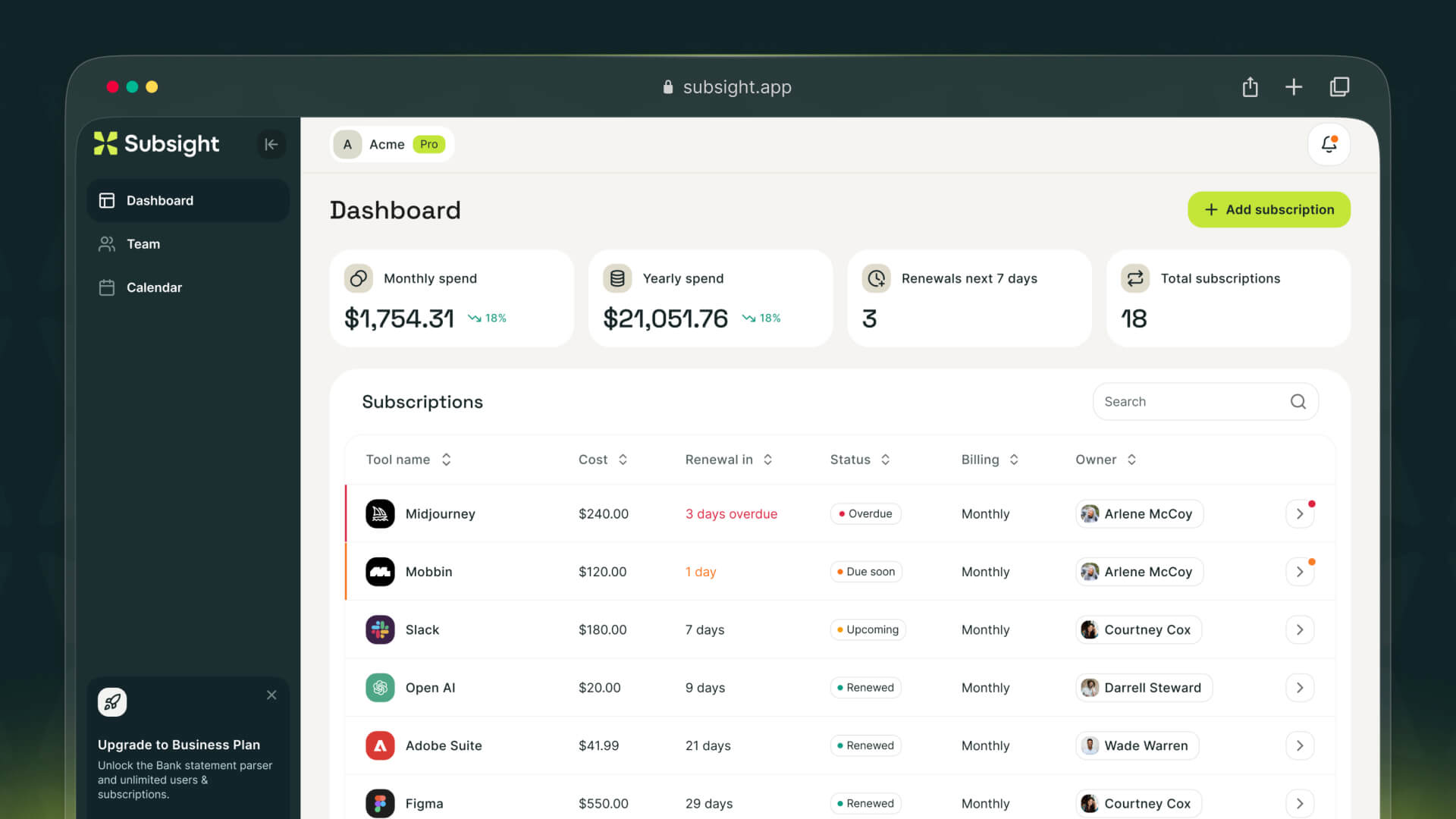
Subsight dashboard displaying SaaS subscriptions, renewal dates, spend totals, vendor names, and ownership tracking.

Manual vs Subsight audit

Step

Manual audit

Subsight

Discovery

Pull and combine multiple data sources

Upload bank or CSV and generate list

Categorization

Manual sorting and tagging

Automatic subscription detection

Cost tracking

Spreadsheet updates

Centralized, always structured view

Ownership

Often unclear

Assigned per subscription

The Subsight shortcut: Skip the manual audit

Fast setup with bank and CSV imports

Upload a bank statement or CSV and generate your stack in minutes. No integrations required. It is designed for teams that want visibility without long setup, similar to what you would see in a typical subscription tracker comparison.

Automatic subscription detection

Transactions are parsed and grouped into subscriptions automatically. You get a structured list instead of raw rows, which removes most of the manual categorization work.

License and cost visibility in one place

Once imported, you can review costs, frequency, and ownership without switching tools.

Renewal awareness without manual tracking

Recurring charges make renewal timing visible by default. You can spot upcoming payments and changes without maintaining separate reminders.

Owner assignment and accountability built-in

Each subscription can be assigned to a responsible person. This keeps decisions clear and prevents tools from sitting unmanaged.

Subsight dashboard displaying SaaS subscriptions, renewal dates, spend totals, vendor names, and ownership tracking.

Manual vs Subsight audit

Step

Manual audit

Subsight

Discovery

Pull and combine multiple data sources

Upload bank or CSV and generate list

Categorization

Manual sorting and tagging

Automatic subscription detection

Cost tracking

Spreadsheet updates

Centralized, always structured view

Ownership

Often unclear

Assigned per subscription

Pro Tip: Run the audit right before your biggest renewal month. That is when leverage is highest. Vendors are more flexible, and you have real data to negotiate or cut. Even a rough utilization snapshot can drive immediate savings.

Common SaaS cost audit mistakes (and quick fixes)

Missing “shadow IT” subscriptions

Tools bought on personal cards or expensed later rarely show up in finance data. Cross-check SSO and ask teams directly. This is where hidden spend usually sits.

Over-focusing on small tools instead of biggest spend

It is easy to cut €10 tools and ignore your top 3 vendors. Start with highest monthly cost. That is where real savings come from.

Ignoring renewal deadlines

Most savings are lost at renewal. If you miss the window, you are locked in. Track dates early and review at least 30 days before.

Treating audits as one-time events

A single audit gives temporary clarity. Without follow-up, the stack drifts again. Set a simple quarterly review.

Pros & cons of manual audits

  • Pros

    • No additional tools required

    • Full control over data

    • Works for very small stacks

  • Cons

    • Data becomes outdated quickly

    • High manual effort

    • Easy to miss hidden tools

    • No continuous visibility

Track your SaaS spend

Get a clearer view of subscriptions, ownership, and upcoming renewals.

Join 100+ founders in line

Frequently asked questions

What is a SaaS cost audit checklist?

How often should startups audit software licenses?

Is there an app that combines all your subscriptions?

How can I find a list of subscriptions (Apple, Google, Bank)?

How can I track down all my subscriptions quickly?

No headings found in content area

Find hidden SaaS subscriptions

Track every tool, owner, and renewal in one place. No spreadsheets. No surprise renewals.

Join 100+ founders in line

Professional portrait of Petras Nargela, Founder of Subsight, against a neutral background.

Petras Nargela

Petras is the Founder of Subsight and a veteran entrepreneur with over 10+ years of experience building and scaling digital ventures. Over the past decade, he has co-founded several successful companies that generate 7-figure annual revenue, including a Shopify app studio and a digital agency. Having managed the complex financial stacks of multiple high-growth businesses, he built Subsight to solve the "SaaS leakage" problem he experienced firsthand. He now helps B2B teams turn software chaos into a strategic, automated advantage.

Get started

Affordable subscription tracking for teams

Track, manage, and cancel subscriptions in minutes. Join the waitlist today to secure 40% off your first 3 months.

Get started

Affordable subscription tracking for teams

Track, manage, and cancel subscriptions in minutes. Join the waitlist today to secure 40% off your first 3 months.

Get started

Affordable subscription tracking for teams

Track, manage, and cancel subscriptions in minutes. Join the waitlist today to secure 40% off your first 3 months.