Cost control
What Is Spend Management Software?
Most startups track expenses, but few actually control how money is spent. This guide breaks down how spend management software works, what problems it solves, and when it starts to matter for growing teams.


TL;DR
Definition
Spend management software centralizes and controls how your company spends money across cards, invoices, and subscriptions. It brings fragmented financial activity into one system so you can see what’s happening without chasing spreadsheets or bank exports, as outlined in what is spend management software.
Why it exists
As teams grow, buying becomes decentralized. Tools get purchased on different cards, invoices sit in inboxes, and no one owns the full picture. That’s where hidden costs and shadow IT start to build, a pattern explored in startup SaaS waste statistics.
What it does
It introduces structure around spending. Budgets, approvals, and real-time tracking sit alongside payments, so decisions are guided before money leaves the account and monitored after.
Key difference
Expense tools record what already happened. Spend management tools shape what is allowed to happen. The focus shifts from reporting to control.
Startup impact
Cleaner visibility leads to faster decisions. Teams cut duplicate tools, reduce unnecessary spend, and keep burn rate under control without adding heavy finance processes.
Spend management software, explained simply
Spend management software is a centralized platform that helps businesses track, control, and optimize all company spending. It connects expenses, invoices, subscriptions, and payments into one system, adding budgeting, approvals, and real-time visibility so teams can prevent overspending before it happens, not just report it afterward, as described in spend management definition.
Why “spend management” became a category
From expense tracking to spend governance
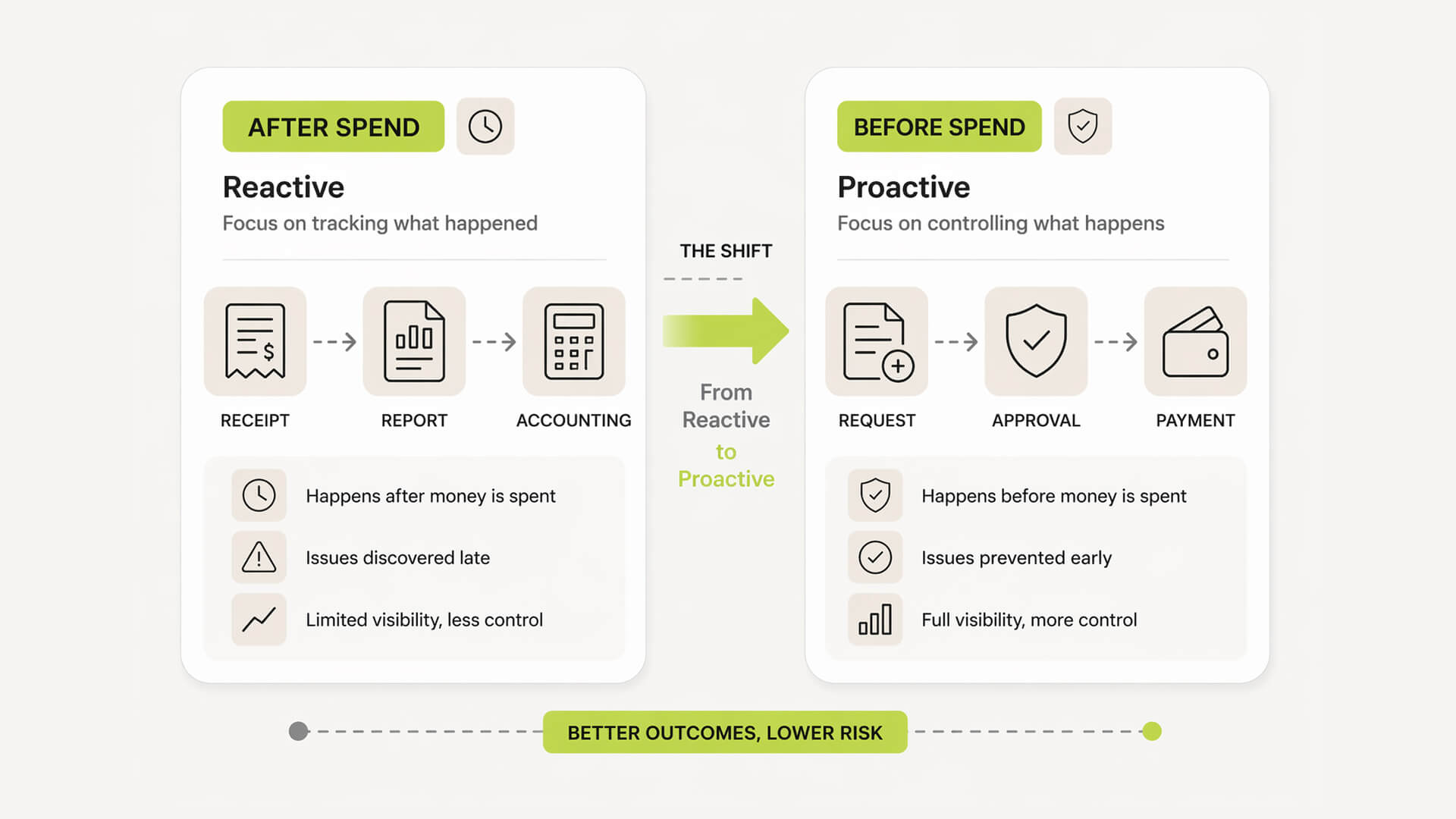
For years, finance tools focused on recording what already happened. Receipts were uploaded, reports filed, and accounting closed the books after the fact. This worked when spending was predictable and centralized.
It breaks when teams start buying software, running experiments, and using multiple payment methods. The need shifted from tracking spend to shaping it. Governance means putting controls in place before money leaves the account, not chasing it afterward, a shift explained in what is spend management.
The rise of SaaS and decentralized buying
SaaS changed how companies spend. Instead of a few large vendors, startups now rely on dozens of tools. Each team can spin up subscriptions in minutes, often without finance involvement.
Payments happen across cards, invoices, and self-serve checkouts. Ownership becomes unclear, renewal dates get missed, and costs quietly compound. Spending is no longer a single workflow but distributed across the company.
The real problem: visibility vs control
Most founders assume the issue is visibility. If they can see all expenses, they believe they can manage them.
In reality, visibility alone changes very little. By the time spend appears in a report, the decision has already been made. What matters is influencing decisions earlier.
What matters is influencing decisions earlier.
What founders think they have
A clear view of all company spend
Control through accounting and reporting
Defined ownership of tools and budgets
Confidence that nothing important is missed
What’s actually happening (shadow IT)
Tools purchased without approval or visibility
Duplicate subscriptions across teams
No clear owner for ongoing costs
Renewals happening without review
Spend decisions made outside finance systems
How spend management software actually works
Data centralization across systems
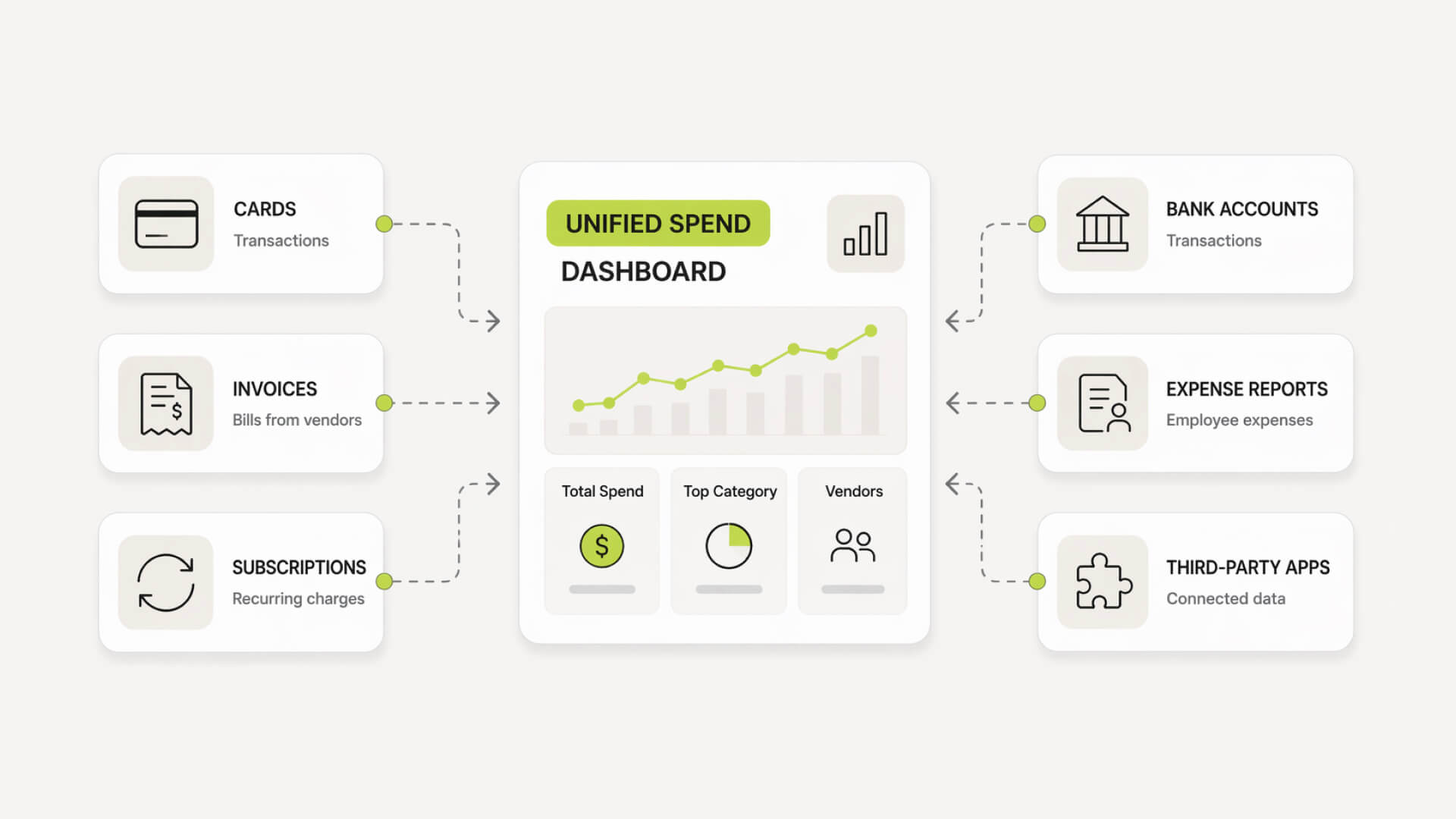
Everything starts with aggregation. Spend management software pulls data from multiple sources into a single layer. Card transactions, invoices, reimbursements, and subscriptions are normalized into a single view, similar to how platforms described in what is spend management operate.
This is where most teams get their first real clarity. Instead of switching between banking apps, inboxes, and spreadsheets, all spend lives in one system with consistent categories, vendors, and ownership. Without this layer, nothing else works.
Policy controls before money leaves
Once data is centralized, the system moves upstream. Instead of reacting to spend, it introduces controls at the moment a purchase is requested. Budgets, approval rules, and category limits are applied before money is committed.
This is the shift from visibility to control.
Teams can define simple rules. For example, purchases above a certain amount require approval, or specific tools must be reviewed before purchase. These guardrails reduce unnecessary spend without slowing teams down.
Automated workflows (requests → approvals → payments)
Manual finance processes do not scale.
Spend management tools automate the full lifecycle of a purchase. A request is submitted, routed to the right approver, and tracked through to payment and reconciliation.
No email chains. No lost context.
Invoices can be captured and matched automatically. Receipts are linked to transactions. Exceptions are flagged instead of buried.
The result is less operational overhead and fewer gaps where spend can slip through unnoticed.
Real-time visibility and reporting
Once everything flows through a single system, reporting becomes immediate.
You can see where money is going by team, vendor, or category without waiting for month-end. Trends emerge early. Overspend can be caught while it is still small.
This is what makes forecasting usable in practice.
Instead of static reports, teams get a live view of spend that supports day-to-day decisions, not just retrospective analysis.
Spend management software, explained simply
Spend management software is a centralized platform that helps businesses track, control, and optimize all company spending. It connects expenses, invoices, subscriptions, and payments into one system, adding budgeting, approvals, and real-time visibility so teams can prevent overspending before it happens, not just report it afterward, as described in spend management definition.
Why “spend management” became a category
From expense tracking to spend governance
For years, finance tools focused on recording what already happened. Receipts were uploaded, reports filed, and accounting closed the books after the fact. This worked when spending was predictable and centralized.
It breaks when teams start buying software, running experiments, and using multiple payment methods. The need shifted from tracking spend to shaping it. Governance means putting controls in place before money leaves the account, not chasing it afterward, a shift explained in what is spend management.
The rise of SaaS and decentralized buying
SaaS changed how companies spend. Instead of a few large vendors, startups now rely on dozens of tools. Each team can spin up subscriptions in minutes, often without finance involvement.
Payments happen across cards, invoices, and self-serve checkouts. Ownership becomes unclear, renewal dates get missed, and costs quietly compound. Spending is no longer a single workflow but distributed across the company.
The real problem: visibility vs control
Most founders assume the issue is visibility. If they can see all expenses, they believe they can manage them.
In reality, visibility alone changes very little. By the time spend appears in a report, the decision has already been made. What matters is influencing decisions earlier.
What matters is influencing decisions earlier.
What founders think they have
A clear view of all company spend
Control through accounting and reporting
Defined ownership of tools and budgets
Confidence that nothing important is missed
What’s actually happening (shadow IT)
Tools purchased without approval or visibility
Duplicate subscriptions across teams
No clear owner for ongoing costs
Renewals happening without review
Spend decisions made outside finance systems
How spend management software actually works
Data centralization across systems
Everything starts with aggregation. Spend management software pulls data from multiple sources into a single layer. Card transactions, invoices, reimbursements, and subscriptions are normalized into a single view, similar to how platforms described in what is spend management operate.
This is where most teams get their first real clarity. Instead of switching between banking apps, inboxes, and spreadsheets, all spend lives in one system with consistent categories, vendors, and ownership. Without this layer, nothing else works.
Policy controls before money leaves
Once data is centralized, the system moves upstream. Instead of reacting to spend, it introduces controls at the moment a purchase is requested. Budgets, approval rules, and category limits are applied before money is committed.
This is the shift from visibility to control.
Teams can define simple rules. For example, purchases above a certain amount require approval, or specific tools must be reviewed before purchase. These guardrails reduce unnecessary spend without slowing teams down.
Automated workflows (requests → approvals → payments)
Manual finance processes do not scale.
Spend management tools automate the full lifecycle of a purchase. A request is submitted, routed to the right approver, and tracked through to payment and reconciliation.
No email chains. No lost context.
Invoices can be captured and matched automatically. Receipts are linked to transactions. Exceptions are flagged instead of buried.
The result is less operational overhead and fewer gaps where spend can slip through unnoticed.
Real-time visibility and reporting
Once everything flows through a single system, reporting becomes immediate.
You can see where money is going by team, vendor, or category without waiting for month-end. Trends emerge early. Overspend can be caught while it is still small.
This is what makes forecasting usable in practice.
Instead of static reports, teams get a live view of spend that supports day-to-day decisions, not just retrospective analysis.


Track your SaaS spend
Get full visibility into subscriptions, owners, and upcoming renewals.

What makes it different from expense management tools
Expense management vs spend management
Expense tools were built for a simpler model. Employees spend, submit receipts, and finance records it.
That works at a small scale. But once spending is distributed across teams, cards, and SaaS tools, recording after the fact is not enough. The problem shifts from documentation to decision-making before money is committed.
Spend management shifts the focus earlier in the process.
Core differences
Area | Expense management | Spend management |
|---|---|---|
Timing | After spend happens | Before and after spend |
Focus | Recording and reimbursement | Control and optimization |
Visibility | Partial, often delayed | Real-time, centralized |
Controls | Limited or manual | Built-in policies and approvals |
Scope | Employee expenses | All company spend |
Outcome | Accurate records | Reduced waste and better decisions |
Why expense tools break at 10–50 employees
This is where complexity compounds.
More people means more cards, more tools, and more independent purchasing. Teams move fast, often bypassing formal processes to get what they need.
Expense tools cannot keep up because they rely on compliance after the purchase. By the time finance sees the spend, the contract is signed or the subscription is active.
At this stage, the issue is not missing receipts. It is lack of control.
The shift from “tracking” to “controlling”
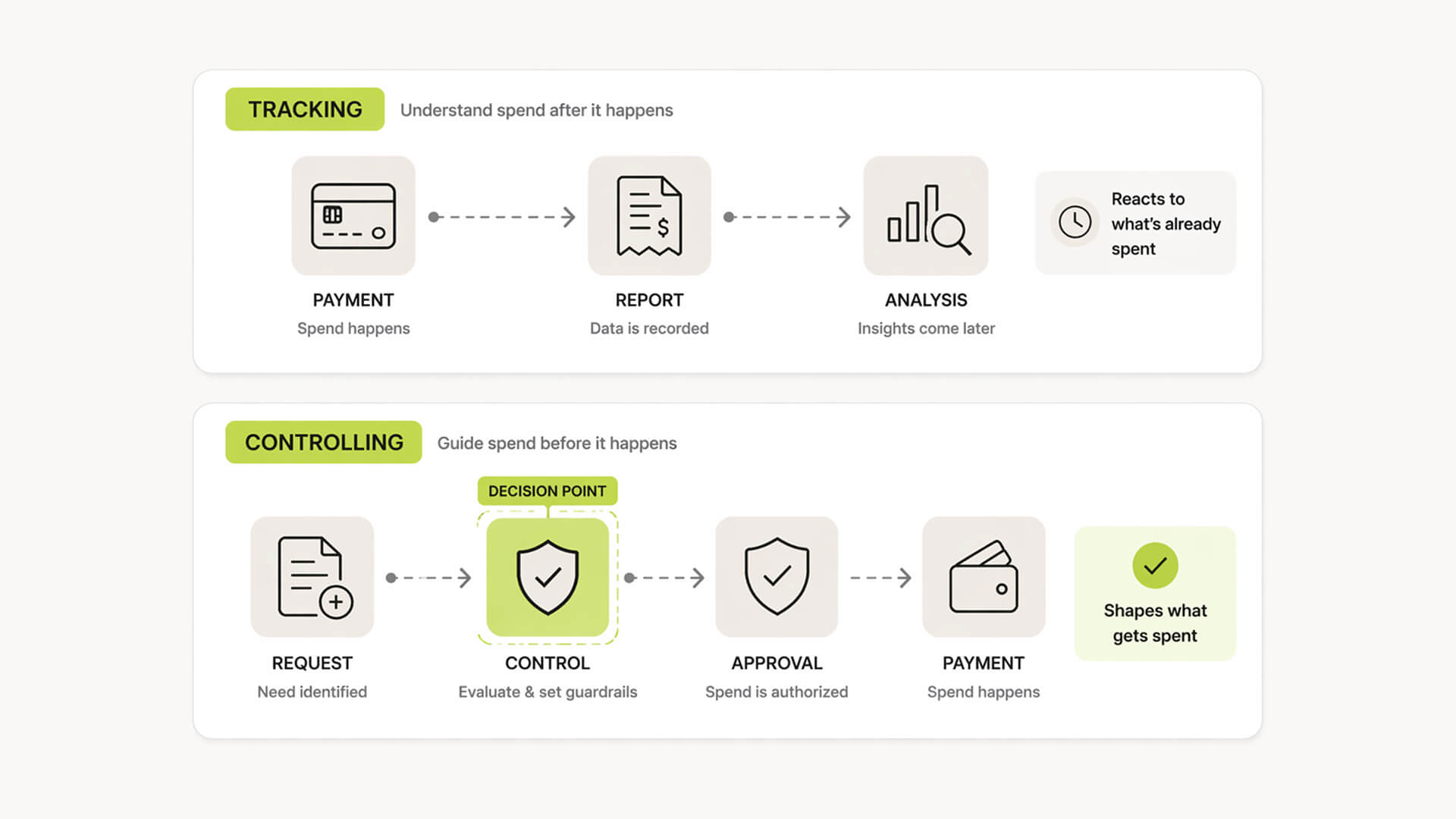
Tracking tells you what happened. Controlling shapes what happens next.
This is the core shift behind the category.
Instead of asking “Where did the money go?”, teams start asking “Should this spend happen at all?” and “Who owns it?”
That change sounds small, but it is operationally significant. It moves finance from a reporting function to a decision layer that directly impacts burn rate and efficiency.
Core features of spend management software
Centralized spend tracking
All spending flows into one system, including subscriptions often uncovered in how to find hidden monthly subscriptions.
Card transactions, invoices, reimbursements, and subscriptions are categorized and grouped in a single dashboard. Vendors are standardized, duplicates become visible, and ownership can be assigned.
This replaces fragmented views across banks, inboxes, and spreadsheets.
Budgeting and spend limits
Budgets move from static plans to active controls.
You can set limits by team, category, or project, then track usage in real time. Alerts trigger before budgets are exceeded, not after.
This is what keeps burn rate predictable as the team grows.
Approval workflows and policies
Spending decisions get structured without adding friction.
Requests can be routed based on amount, role, or category. Policies define what needs approval and what does not.
Instead of chasing approvals manually, rules handle it in the background.
Procurement and invoice management
Non-card spend is brought into the same system.
Purchase requests, vendor invoices, and approvals are tracked from request to payment. Invoices can be captured, matched, and categorized without relying on email threads.
This closes a common gap where large costs sit outside visibility.
Corporate and virtual cards
Cards become controllable, not just usable.
Teams can issue cards with predefined limits, merchant restrictions, or budgets. Virtual cards are often tied to specific tools or vendors.
This reduces misuse and improves traceability of spend.
Integrations and accounting sync
The system connects to your existing stack.
Transactions sync with accounting tools, mapping to categories, cost centers, and tax rules. Data flows cleanly into the general ledger without manual reconciliation.
This removes duplication of work for finance.
Analytics and forecasting
Spend data becomes usable for decisions.
You can break down costs by vendor, team, or category and spot trends early. Forecasting becomes more accurate because it is based on real-time data, not outdated reports.
This is where optimization starts.
Spend data becomes usable for decisions, with reporting and forecasting capabilities similar to those outlined in spend analytics and forecasting benefits.
Feature breakdown for startups
Feature | What it solves | Why it matters at 10–50 people |
|---|---|---|
Centralized tracking | Fragmented visibility | Gives a single source of truth |
Budgeting & limits | Uncontrolled spending | Keeps burn rate predictable |
Approval workflows | Ad hoc decisions | Adds structure without slowing teams |
Invoice management | Hidden non-card spend | Captures larger, recurring costs |
Corporate cards | Untracked purchases | Links spend to owners and tools |
Integrations | Manual reconciliation | Saves time and reduces errors |
Analytics | Lack of insight | Enables cost-cutting and planning |
Types of spend management software
Expense management tools
Focused on employee spending.
These tools handle reimbursements, receipt capture, and expense reports. They are often the first step for startups but operate after spend happens, which limits control as complexity grows.
Procurement platforms
Built for structured purchasing.
They manage purchase requests, vendor approvals, and purchase orders. Useful for companies with larger, planned spend, especially when multiple stakeholders are involved in buying decisions.
AP / invoice automation tools
Designed for invoice-heavy workflows.
They capture, route, and reconcile invoices, often with approval chains and accounting sync. This is where non-card spend like vendor contracts and services gets managed.
Corporate card platforms
Control card-based spending.
They provide physical and virtual cards with limits, restrictions, and real-time tracking. Strong for day-to-day operational spend but often limited outside card transactions.
SaaS spend & subscription tracking tools
Focused on software visibility, often expanded in best subscription tracker.
They track subscriptions, renewal dates, and tool usage across the company. This is where hidden SaaS costs, duplicate tools, and unused licenses are surfaced.
When you need each type
Use expense management tools when you need basic reimbursement and reporting
Use procurement platforms when purchases require approvals and structured workflows
Use AP tools when invoices are a major part of your spend
Use corporate cards when teams need controlled, flexible spending
Use SaaS tracking tools when subscriptions start spreading across teams and become hard to track
Why startups actually adopt spend management software
Burn rate control
This is usually the trigger. Founders notice expenses growing faster than expected but cannot clearly explain why. Costs are spread across tools, cards, and invoices with no single place to monitor them in real time.
Spend management brings that back under control by making costs visible early and enforceable before they scale.
Eliminating duplicate tools
As teams grow, the same problem gets solved multiple times.
Marketing buys one tool, product buys another, and operations adds a third. Without visibility, duplication goes unnoticed.
Centralized tracking exposes overlap quickly. Once tools are visible and assigned, consolidation becomes straightforward.
Reducing manual finance work
Finance overhead creeps in quietly. Chasing receipts, reconciling transactions, and matching invoices across systems takes time, and most of it is repetitive and error-prone. Automation removes much of this workload, freeing time for analysis instead of data cleanup.
Automation removes a large part of this workload, freeing time for analysis instead of data cleanup, a benefit widely noted in spend management efficiency benefits.
Gaining real-time visibility
Most teams operate on delayed information.
Reports come at the end of the month, when it is too late to act. Spend management shifts this to a live view, where decisions can be adjusted as costs evolve.
This is what makes cost control practical, not theoretical.
Preparing for scale (and investors)
As the company grows, expectations change.
Investors and stakeholders expect clear answers on spend, efficiency, and ownership. Ad hoc processes do not hold up under scrutiny.
Structured spend data and clear controls make reporting easier and signal operational maturity.
Immediate ROI areas
Cancelling unused or forgotten subscriptions
Identifying duplicate tools across teams
Reducing time spent on manual reconciliation
Preventing out-of-policy purchases early
Improving accuracy of budget tracking
Assigning clear ownership to recurring costs
Where most startups leak money (and don’t see it)
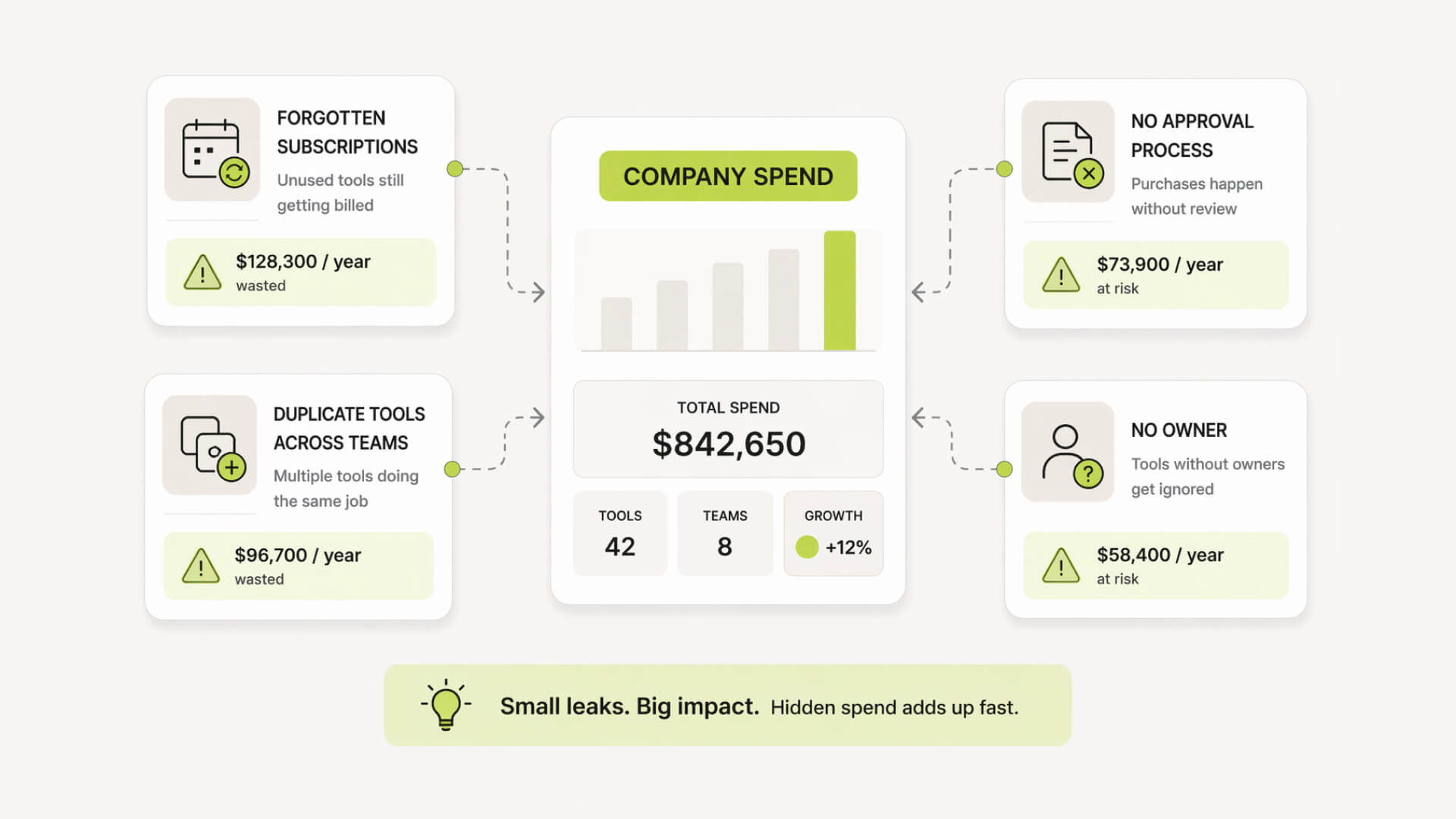
Forgotten subscriptions
Subscriptions rarely fail loudly. A tool gets tested, a card is charged, and it renews every month. Over time, these stack up. Some are still used. Many are not.
Without a clear view of renewal dates and ownership, these costs stay invisible but compound quickly.
Decentralized tool purchases
Buying software has never been easier.
Anyone can sign up, upgrade, and expense a tool in minutes. That speed is useful, but it creates fragmentation. Different teams solve the same problem in parallel, often without knowing it.
The result is overlapping tools, inconsistent workflows, and higher total spend.
No approval process
In early stages, approvals feel unnecessary.
Teams move fast, and adding friction seems counterproductive. But without even lightweight checks, spending decisions happen in isolation.
Small purchases slip through. Larger ones set precedents. Over time, this creates a pattern where spend grows without alignment to priorities.
Poor ownership of spend
Unowned spend is unmanaged spend.
When no one is responsible for a tool or vendor, no one questions its value. Renewals go through by default. Usage declines, but costs stay the same.
Clear ownership changes behavior. Without it, waste is almost guaranteed.
When you actually need spend management software
The 10–50 employee inflection point
This is where things start to slip.
Spending is no longer centralized. Teams have their own tools, cards, and budgets. What used to be manageable in a spreadsheet becomes fragmented across systems.
You still feel in control, but decisions are happening without visibility.
Signs you’ve outgrown spreadsheets
Spreadsheets work until they don’t. They rely on manual updates and delayed inputs. As spend increases, gaps appear, data becomes outdated, and reconciliation turns into a recurring task. At that point, the issue is not tracking but reliability.
Quick self-assessment checklist
If you are unsure, look at how spend behaves day to day.
Red flags
You cannot confidently list all active subscriptions
Different teams use different tools for the same purpose
You find charges you do not recognize
Budget tracking happens after the month ends
No clear owner exists for recurring spend
Approvals happen informally or not at all
What makes it different from expense management tools
Expense management vs spend management
Expense tools were built for a simpler model. Employees spend, submit receipts, and finance records it.
That works at a small scale. But once spending is distributed across teams, cards, and SaaS tools, recording after the fact is not enough. The problem shifts from documentation to decision-making before money is committed.
Spend management shifts the focus earlier in the process.
Core differences
Area | Expense management | Spend management |
|---|---|---|
Timing | After spend happens | Before and after spend |
Focus | Recording and reimbursement | Control and optimization |
Visibility | Partial, often delayed | Real-time, centralized |
Controls | Limited or manual | Built-in policies and approvals |
Scope | Employee expenses | All company spend |
Outcome | Accurate records | Reduced waste and better decisions |
Why expense tools break at 10–50 employees
This is where complexity compounds.
More people means more cards, more tools, and more independent purchasing. Teams move fast, often bypassing formal processes to get what they need.
Expense tools cannot keep up because they rely on compliance after the purchase. By the time finance sees the spend, the contract is signed or the subscription is active.
At this stage, the issue is not missing receipts. It is lack of control.
The shift from “tracking” to “controlling”
Tracking tells you what happened. Controlling shapes what happens next.
This is the core shift behind the category.
Instead of asking “Where did the money go?”, teams start asking “Should this spend happen at all?” and “Who owns it?”
That change sounds small, but it is operationally significant. It moves finance from a reporting function to a decision layer that directly impacts burn rate and efficiency.
Core features of spend management software
Centralized spend tracking
All spending flows into one system, including subscriptions often uncovered in how to find hidden monthly subscriptions.
Card transactions, invoices, reimbursements, and subscriptions are categorized and grouped in a single dashboard. Vendors are standardized, duplicates become visible, and ownership can be assigned.
This replaces fragmented views across banks, inboxes, and spreadsheets.
Budgeting and spend limits
Budgets move from static plans to active controls.
You can set limits by team, category, or project, then track usage in real time. Alerts trigger before budgets are exceeded, not after.
This is what keeps burn rate predictable as the team grows.
Approval workflows and policies
Spending decisions get structured without adding friction.
Requests can be routed based on amount, role, or category. Policies define what needs approval and what does not.
Instead of chasing approvals manually, rules handle it in the background.
Procurement and invoice management
Non-card spend is brought into the same system.
Purchase requests, vendor invoices, and approvals are tracked from request to payment. Invoices can be captured, matched, and categorized without relying on email threads.
This closes a common gap where large costs sit outside visibility.
Corporate and virtual cards
Cards become controllable, not just usable.
Teams can issue cards with predefined limits, merchant restrictions, or budgets. Virtual cards are often tied to specific tools or vendors.
This reduces misuse and improves traceability of spend.
Integrations and accounting sync
The system connects to your existing stack.
Transactions sync with accounting tools, mapping to categories, cost centers, and tax rules. Data flows cleanly into the general ledger without manual reconciliation.
This removes duplication of work for finance.
Analytics and forecasting
Spend data becomes usable for decisions.
You can break down costs by vendor, team, or category and spot trends early. Forecasting becomes more accurate because it is based on real-time data, not outdated reports.
This is where optimization starts.
Spend data becomes usable for decisions, with reporting and forecasting capabilities similar to those outlined in spend analytics and forecasting benefits.
Feature breakdown for startups
Feature | What it solves | Why it matters at 10–50 people |
|---|---|---|
Centralized tracking | Fragmented visibility | Gives a single source of truth |
Budgeting & limits | Uncontrolled spending | Keeps burn rate predictable |
Approval workflows | Ad hoc decisions | Adds structure without slowing teams |
Invoice management | Hidden non-card spend | Captures larger, recurring costs |
Corporate cards | Untracked purchases | Links spend to owners and tools |
Integrations | Manual reconciliation | Saves time and reduces errors |
Analytics | Lack of insight | Enables cost-cutting and planning |
Types of spend management software
Expense management tools
Focused on employee spending.
These tools handle reimbursements, receipt capture, and expense reports. They are often the first step for startups but operate after spend happens, which limits control as complexity grows.
Procurement platforms
Built for structured purchasing.
They manage purchase requests, vendor approvals, and purchase orders. Useful for companies with larger, planned spend, especially when multiple stakeholders are involved in buying decisions.
AP / invoice automation tools
Designed for invoice-heavy workflows.
They capture, route, and reconcile invoices, often with approval chains and accounting sync. This is where non-card spend like vendor contracts and services gets managed.
Corporate card platforms
Control card-based spending.
They provide physical and virtual cards with limits, restrictions, and real-time tracking. Strong for day-to-day operational spend but often limited outside card transactions.
SaaS spend & subscription tracking tools
Focused on software visibility, often expanded in best subscription tracker.
They track subscriptions, renewal dates, and tool usage across the company. This is where hidden SaaS costs, duplicate tools, and unused licenses are surfaced.
When you need each type
Use expense management tools when you need basic reimbursement and reporting
Use procurement platforms when purchases require approvals and structured workflows
Use AP tools when invoices are a major part of your spend
Use corporate cards when teams need controlled, flexible spending
Use SaaS tracking tools when subscriptions start spreading across teams and become hard to track
Why startups actually adopt spend management software
Burn rate control
This is usually the trigger. Founders notice expenses growing faster than expected but cannot clearly explain why. Costs are spread across tools, cards, and invoices with no single place to monitor them in real time.
Spend management brings that back under control by making costs visible early and enforceable before they scale.
Eliminating duplicate tools
As teams grow, the same problem gets solved multiple times.
Marketing buys one tool, product buys another, and operations adds a third. Without visibility, duplication goes unnoticed.
Centralized tracking exposes overlap quickly. Once tools are visible and assigned, consolidation becomes straightforward.
Reducing manual finance work
Finance overhead creeps in quietly. Chasing receipts, reconciling transactions, and matching invoices across systems takes time, and most of it is repetitive and error-prone. Automation removes much of this workload, freeing time for analysis instead of data cleanup.
Automation removes a large part of this workload, freeing time for analysis instead of data cleanup, a benefit widely noted in spend management efficiency benefits.
Gaining real-time visibility
Most teams operate on delayed information.
Reports come at the end of the month, when it is too late to act. Spend management shifts this to a live view, where decisions can be adjusted as costs evolve.
This is what makes cost control practical, not theoretical.
Preparing for scale (and investors)
As the company grows, expectations change.
Investors and stakeholders expect clear answers on spend, efficiency, and ownership. Ad hoc processes do not hold up under scrutiny.
Structured spend data and clear controls make reporting easier and signal operational maturity.
Immediate ROI areas
Cancelling unused or forgotten subscriptions
Identifying duplicate tools across teams
Reducing time spent on manual reconciliation
Preventing out-of-policy purchases early
Improving accuracy of budget tracking
Assigning clear ownership to recurring costs
Where most startups leak money (and don’t see it)
Forgotten subscriptions
Subscriptions rarely fail loudly. A tool gets tested, a card is charged, and it renews every month. Over time, these stack up. Some are still used. Many are not.
Without a clear view of renewal dates and ownership, these costs stay invisible but compound quickly.
Decentralized tool purchases
Buying software has never been easier.
Anyone can sign up, upgrade, and expense a tool in minutes. That speed is useful, but it creates fragmentation. Different teams solve the same problem in parallel, often without knowing it.
The result is overlapping tools, inconsistent workflows, and higher total spend.
No approval process
In early stages, approvals feel unnecessary.
Teams move fast, and adding friction seems counterproductive. But without even lightweight checks, spending decisions happen in isolation.
Small purchases slip through. Larger ones set precedents. Over time, this creates a pattern where spend grows without alignment to priorities.
Poor ownership of spend
Unowned spend is unmanaged spend.
When no one is responsible for a tool or vendor, no one questions its value. Renewals go through by default. Usage declines, but costs stay the same.
Clear ownership changes behavior. Without it, waste is almost guaranteed.
When you actually need spend management software
The 10–50 employee inflection point
This is where things start to slip.
Spending is no longer centralized. Teams have their own tools, cards, and budgets. What used to be manageable in a spreadsheet becomes fragmented across systems.
You still feel in control, but decisions are happening without visibility.
Signs you’ve outgrown spreadsheets
Spreadsheets work until they don’t. They rely on manual updates and delayed inputs. As spend increases, gaps appear, data becomes outdated, and reconciliation turns into a recurring task. At that point, the issue is not tracking but reliability.
Quick self-assessment checklist
If you are unsure, look at how spend behaves day to day.
Red flags
You cannot confidently list all active subscriptions
Different teams use different tools for the same purpose
You find charges you do not recognize
Budget tracking happens after the month ends
No clear owner exists for recurring spend
Approvals happen informally or not at all

Still tracking this manually?
Subsight automatically maps your tools, owners, and renewal timelines in one place.
Implementation: what it looks like in practice
Setup timeline
Implementation is usually lighter than expected. Most startups can get initial visibility within days, not months. The first phase focuses on connecting data sources and cleaning up existing spend. Structure and controls come after.
Adoption tends to follow quickly once teams see a complete picture of spend.
Typical rollout phases
Phase | What happens | Outcome |
|---|---|---|
Data connection | Connect cards, accounts, and tools | Centralized visibility |
Spend cleanup | Categorize vendors, remove duplicates | Clear baseline of spend |
Policy setup | Define budgets, approvals, ownership | Controlled decision-making |
Workflow automation | Implement requests and approvals | Reduced manual work |
Optimization | Monitor trends and adjust spend | Ongoing cost control |
What you need before you start
You do not need a perfect finance setup.
A basic understanding of your main spend categories, who owns them, and where payments happen is enough. Even partial data is useful. The system becomes more accurate as you refine it.
Clarity improves during implementation, not before.
Common mistakes to avoid
Trying to over-engineer the setup early is the most common issue.
Teams often add too many rules, too many categories, or try to map everything perfectly from day one. This slows adoption and creates friction.
Start simple. Focus on visibility and ownership first. Add structure once the system is in use.
Where SaaS tracking fits into spend management
Why SaaS is the hardest spend to control
SaaS does not behave like traditional spend.
It is recurring, easy to purchase, and often tied to individuals rather than departments. A single tool can scale from a free trial to a meaningful monthly cost without a formal decision point.
That makes it one of the easiest areas for waste to accumulate.
Subscription visibility vs financial visibility
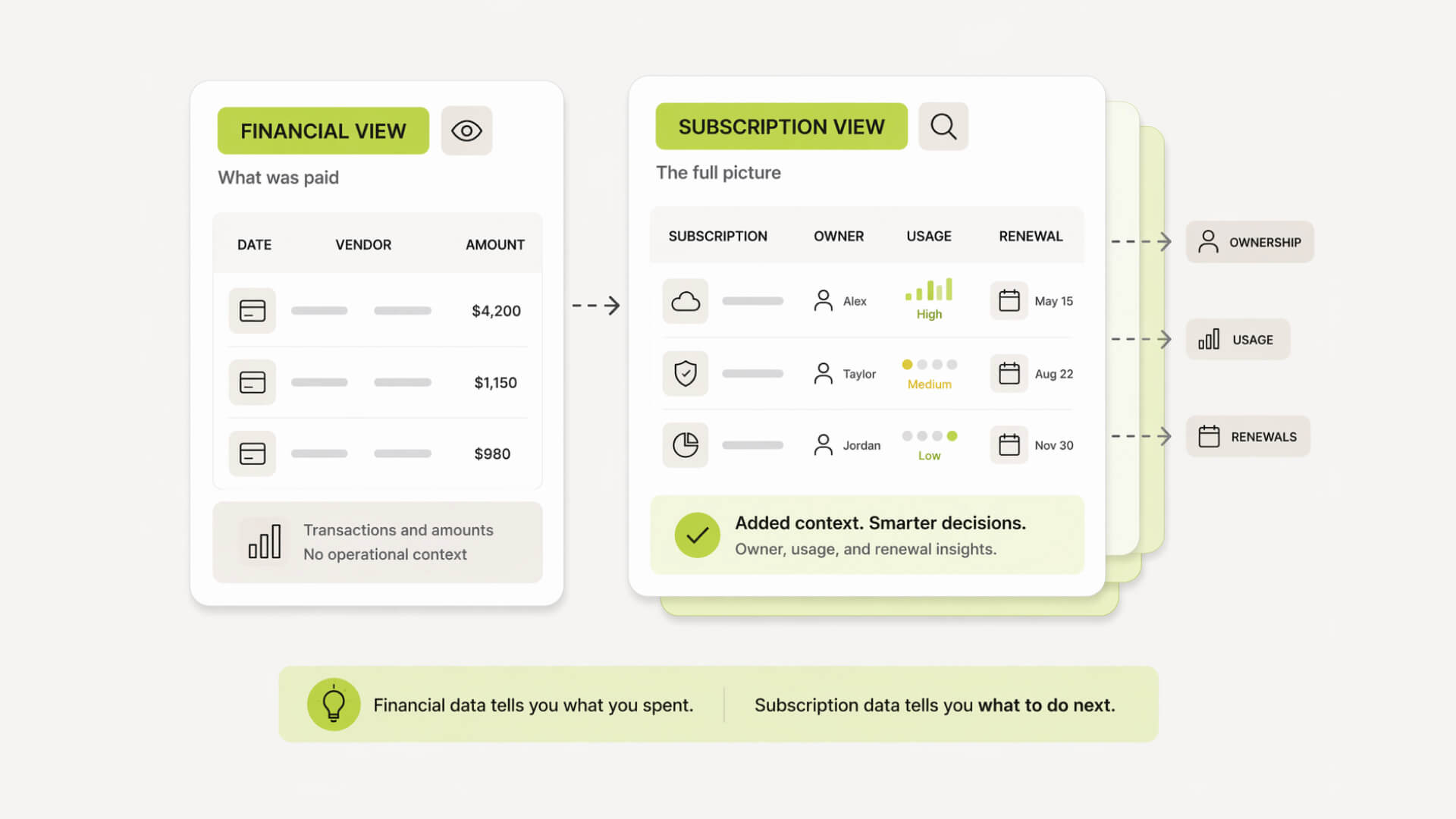
Most finance tools show transactions, not context. You might see a charge from a vendor, but not who owns it, what it is used for, or whether it is still needed.
Subscription visibility adds context. It connects spend to tools, teams, usage, and renewal timelines, making decisions actionable.
Example: subscription sprawl in growing teams
A team starts with a few core tools.
Then each function adds its own stack. Marketing experiments with new platforms, product adds analytics tools, and operations introduces internal software.
Individually, each decision makes sense. Collectively, it creates overlap, unused licenses, and rising costs that no one fully tracks.
A simple example of modern spend visibility
Before: fragmented tools and blind spots
Spend lives in different places. Cards show transactions, accounting shows totals, and invoices sit in inboxes. No single view connects them. You may know how much was spent, but not why, by whom, or on what.
Ownership is unclear. Renewals pass quietly. Decisions happen in isolation.
After: centralized dashboard and ownership
All spend is visible in one place.
Each tool, vendor, and transaction is tied to an owner, a category, and a purpose. Renewals are known in advance. Costs can be reviewed before they repeat.
Instead of reacting late, teams make decisions with context and control.
Implementation: what it looks like in practice
Setup timeline
Implementation is usually lighter than expected. Most startups can get initial visibility within days, not months. The first phase focuses on connecting data sources and cleaning up existing spend. Structure and controls come after.
Adoption tends to follow quickly once teams see a complete picture of spend.
Typical rollout phases
Phase | What happens | Outcome |
|---|---|---|
Data connection | Connect cards, accounts, and tools | Centralized visibility |
Spend cleanup | Categorize vendors, remove duplicates | Clear baseline of spend |
Policy setup | Define budgets, approvals, ownership | Controlled decision-making |
Workflow automation | Implement requests and approvals | Reduced manual work |
Optimization | Monitor trends and adjust spend | Ongoing cost control |
What you need before you start
You do not need a perfect finance setup.
A basic understanding of your main spend categories, who owns them, and where payments happen is enough. Even partial data is useful. The system becomes more accurate as you refine it.
Clarity improves during implementation, not before.
Common mistakes to avoid
Trying to over-engineer the setup early is the most common issue.
Teams often add too many rules, too many categories, or try to map everything perfectly from day one. This slows adoption and creates friction.
Start simple. Focus on visibility and ownership first. Add structure once the system is in use.
Where SaaS tracking fits into spend management
Why SaaS is the hardest spend to control
SaaS does not behave like traditional spend.
It is recurring, easy to purchase, and often tied to individuals rather than departments. A single tool can scale from a free trial to a meaningful monthly cost without a formal decision point.
That makes it one of the easiest areas for waste to accumulate.
Subscription visibility vs financial visibility
Most finance tools show transactions, not context. You might see a charge from a vendor, but not who owns it, what it is used for, or whether it is still needed.
Subscription visibility adds context. It connects spend to tools, teams, usage, and renewal timelines, making decisions actionable.
Example: subscription sprawl in growing teams
A team starts with a few core tools.
Then each function adds its own stack. Marketing experiments with new platforms, product adds analytics tools, and operations introduces internal software.
Individually, each decision makes sense. Collectively, it creates overlap, unused licenses, and rising costs that no one fully tracks.
A simple example of modern spend visibility
Before: fragmented tools and blind spots
Spend lives in different places. Cards show transactions, accounting shows totals, and invoices sit in inboxes. No single view connects them. You may know how much was spent, but not why, by whom, or on what.
Ownership is unclear. Renewals pass quietly. Decisions happen in isolation.
After: centralized dashboard and ownership
All spend is visible in one place.
Each tool, vendor, and transaction is tied to an owner, a category, and a purpose. Renewals are known in advance. Costs can be reviewed before they repeat.
Instead of reacting late, teams make decisions with context and control.

Pro Tip: Most teams try to fix spend after it happens. The real leverage is upstream. Add lightweight approval rules and clear ownership early, even in a spreadsheet, and you prevent most waste before it reaches your account.
The bottom line
Why this category matters now
Spending has changed. It is faster, more distributed, and harder to track across tools, teams, and payment methods. What used to be manageable through accounting now requires real-time oversight.
Without it, costs scale quietly alongside growth.
The shift from payments to governance
The focus is no longer just moving money.
It is about shaping how and why money is spent. Governance introduces structure before decisions are made, not just visibility after they are recorded.
This is what keeps spend aligned with priorities.
Where tools like Subsight fit
Tools like Subsight sit at the visibility layer, especially for SaaS spend.
They help teams understand what they are paying for, who owns it, and when it renews, so decisions can be made before costs compound.

Take control of your SaaS stack
Stop guessing. Know exactly what you’re paying for and who owns it.
Frequently asked questions
What is spend management software in simple terms?
How is spend management different from expense management?
Do startups really need spend management software?
What features should I look for first?
How quickly can you see ROI from these tools?

Find hidden SaaS subscriptions
Track every tool, owner, and renewal in one place. No spreadsheets. No surprise renewals.
Join 100+ founders in line

Petras Nargela

Petras is the Founder of Subsight and a veteran entrepreneur with over 10+ years of experience building and scaling digital ventures. Over the past decade, he has co-founded several successful companies that generate 7-figure annual revenue, including a Shopify app studio and a digital agency. Having managed the complex financial stacks of multiple high-growth businesses, he built Subsight to solve the "SaaS leakage" problem he experienced firsthand. He now helps B2B teams turn software chaos into a strategic, automated advantage.
SaaS audits
How to Audit Your SaaS Cost Stack in Under 2 Hours
Apr 8, 2026
6 min. read
SaaS audits
How to Audit Your SaaS Cost Stack in Under 2 Hours
Apr 8, 2026
6 min. read
Cost control
The 7 Best Spend Management Platforms for Startups in 2026
Feb 18, 2026
11 min. read
Cost control
The 7 Best Spend Management Platforms for Startups in 2026
Feb 18, 2026
11 min. read
Cost control
What is SaaS Management? The 2026 Guide
Feb 2, 2026
12 min. read

Cost control
What is SaaS Management? The 2026 Guide
Feb 2, 2026
12 min. read

Affordable subscription tracking for teams
Track, manage, and cancel subscriptions in minutes. Join the waitlist today to secure 40% off your first 3 months.







































Affordable subscription tracking for teams
Track, manage, and cancel subscriptions in minutes. Join the waitlist today to secure 40% off your first 3 months.
Affordable subscription tracking for teams
Track, manage, and cancel subscriptions in minutes. Join the waitlist today to secure 40% off your first 3 months.