Cost control

2026 SaaS Spending Benchmarks: Are You Overpaying?

This benchmark guide helps founders and ops leads judge whether their software spend looks lean, normal, or inflated for their size. It focuses on the team-size jump most generic SMB reports blur together: 1 to 10 employees versus 11 to 50.

8 min. read
SaaS Spending Benchmarks — Subsight guide to software spend per employee in 2026.
No headings found in content area

TL;DR

  • Most startups should treat $4,800 to $5,600 per employee per year as a broad market benchmark.
    That is a useful starting point, but it hides big differences between a five-person team and a forty-person team.

  • Very small teams usually pay more per employee.
    Fixed tool costs get spread across fewer people, so a 1 to 10 person startup can look expensive on a per-employee basis without doing anything reckless.

  • The red flag is not just a high number.
    It is high spend combined with weak ownership, duplicate tools, unused seats, or SaaS taking an outsized share of operating expenses.

  • Benchmarks are only useful if they lead to action.
    If your spend looks heavy, review seats, categories, renewals, and owner accountability before you start cutting tools people genuinely need.
Software rarely feels expensive one tool at a time. The problem shows up later, when five cheap subscriptions turn into twenty, a few AI add-ons sneak onto the card, and nobody can say which costs are essential versus inherited. If you are trying to sanity-check your stack, SaaS spend per employee is one of the cleanest numbers to start with, as long as you compare it against the right kind of company.

What is the average SaaS spend per employee?

Broad 2025 to 2026 benchmark sources cluster around $4,830 to $5,607 per employee per year, but lean startups should split the number by size. Teams with 1 to 10 employees usually absorb more shared-tool cost per person than 11 to 50 employee teams, so one SMB average can mislead.

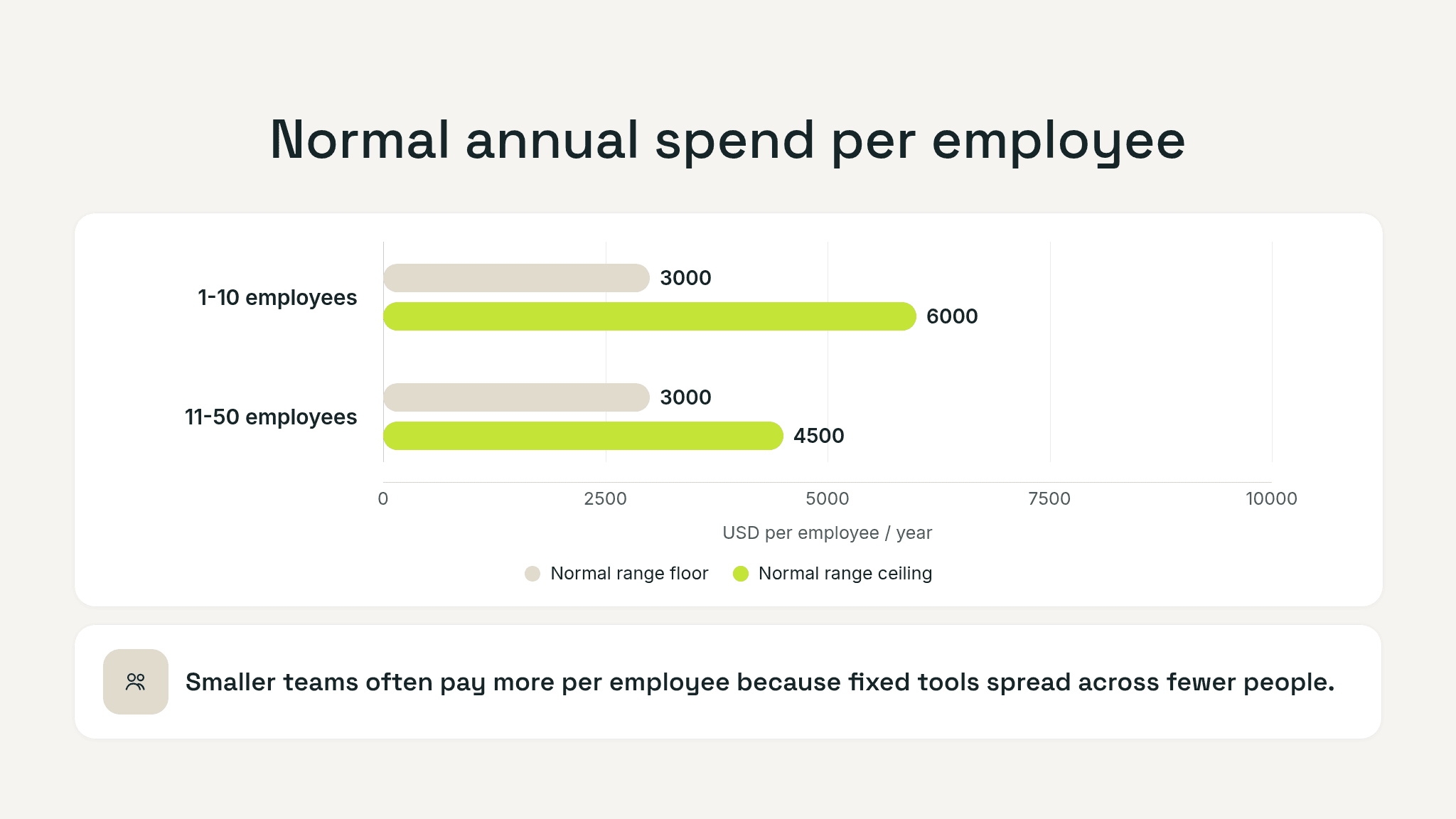
Benchmark graphic comparing normal SaaS spend bands for teams with 1 to 10 employees versus 11 to 50 employees, with notes on higher-spend cases and red flags.

Why one benchmark number is not enough

The phrase average SaaS spend per employee sounds precise, but it hides three things that matter in practice.

First, a five-person company and a forty-person company do not buy software the same way. A tiny team still needs core tools like payroll, finance, project management, analytics, CRM, and collaboration. Those baseline costs exist whether you have five employees or fifty. On a tiny headcount, each shared tool hits harder per person.

Second, stage changes the mix. Pre-seed teams often buy point solutions quickly because the cost of moving slowly feels worse than the cost of another subscription. By the time a company reaches 20 or 30 employees, software categories multiply, but procurement usually gets tighter. That can bring per-employee cost down in some areas even while total spend rises.

Third, source methodology varies. Some benchmarks look at all businesses. Some lean toward larger SMBs or enterprise-heavy samples. Some count only SaaS. Others blur software, cloud, and adjacent tooling. That spread is easy to see when you compare Zylo-based summaries with higher-end Vertice benchmarks. That is why a single “industry average” can mislead founders trying to judge a lean startup against a mixed market.

SaaS spend benchmarks for startups with 1 to 10 employees

For the smallest startups, high per-employee SaaS spend is common. It does not automatically mean waste.

Research summaries built from Zylo, startup SaaS budget guides, and small-business spend datasets suggest that the smallest teams can land anywhere from roughly $2,400 to $8,000 per employee per year depending on stage, tool mix, and how much AI or specialist software they have layered in. Pre-seed teams often sit toward the lower half of that range. Seed-stage teams can move upward quickly once they add sales, support, finance, analytics, and AI tools.

As a working benchmark for a lean 1 to 10 person startup:

  • Under $3,000 per employee per year is lean and often realistic for very early teams with a tight stack.

  • $3,000 to $6,000 per employee per year is a healthy normal range for many small startups.

  • $6,000 to $8,000 per employee per year can still be justified, but it deserves explanation.

  • Above $8,000 per employee per year is where you should expect to defend every major category.

That last point matters. A five-person startup can easily look expensive because shared tools distort the math.

Usually it is a mix of symptoms:

  • multiple tools solving the same job

  • founder cards carrying subscriptions nobody reviews

  • annual renewals that roll forward by default

  • premium plans bought for one feature and kept out of habit

  • no owner assigned to each recurring tool

If those problems are present, even a “normal” benchmark number may be hiding sloppy spend.

Software rarely feels expensive one tool at a time. The problem shows up later, when five cheap subscriptions turn into twenty, a few AI add-ons sneak onto the card, and nobody can say which costs are essential versus inherited. If you are trying to sanity-check your stack, SaaS spend per employee is one of the cleanest numbers to start with, as long as you compare it against the right kind of company.

What is the average SaaS spend per employee?

Broad 2025 to 2026 benchmark sources cluster around $4,830 to $5,607 per employee per year, but lean startups should split the number by size. Teams with 1 to 10 employees usually absorb more shared-tool cost per person than 11 to 50 employee teams, so one SMB average can mislead.

Benchmark graphic comparing normal SaaS spend bands for teams with 1 to 10 employees versus 11 to 50 employees, with notes on higher-spend cases and red flags.

Why one benchmark number is not enough

The phrase average SaaS spend per employee sounds precise, but it hides three things that matter in practice.

First, a five-person company and a forty-person company do not buy software the same way. A tiny team still needs core tools like payroll, finance, project management, analytics, CRM, and collaboration. Those baseline costs exist whether you have five employees or fifty. On a tiny headcount, each shared tool hits harder per person.

Second, stage changes the mix. Pre-seed teams often buy point solutions quickly because the cost of moving slowly feels worse than the cost of another subscription. By the time a company reaches 20 or 30 employees, software categories multiply, but procurement usually gets tighter. That can bring per-employee cost down in some areas even while total spend rises.

Third, source methodology varies. Some benchmarks look at all businesses. Some lean toward larger SMBs or enterprise-heavy samples. Some count only SaaS. Others blur software, cloud, and adjacent tooling. That spread is easy to see when you compare Zylo-based summaries with higher-end Vertice benchmarks. That is why a single “industry average” can mislead founders trying to judge a lean startup against a mixed market.

SaaS spend benchmarks for startups with 1 to 10 employees

For the smallest startups, high per-employee SaaS spend is common. It does not automatically mean waste.

Research summaries built from Zylo, startup SaaS budget guides, and small-business spend datasets suggest that the smallest teams can land anywhere from roughly $2,400 to $8,000 per employee per year depending on stage, tool mix, and how much AI or specialist software they have layered in. Pre-seed teams often sit toward the lower half of that range. Seed-stage teams can move upward quickly once they add sales, support, finance, analytics, and AI tools.

As a working benchmark for a lean 1 to 10 person startup:

  • Under $3,000 per employee per year is lean and often realistic for very early teams with a tight stack.

  • $3,000 to $6,000 per employee per year is a healthy normal range for many small startups.

  • $6,000 to $8,000 per employee per year can still be justified, but it deserves explanation.

  • Above $8,000 per employee per year is where you should expect to defend every major category.

That last point matters. A five-person startup can easily look expensive because shared tools distort the math.

Usually it is a mix of symptoms:

  • multiple tools solving the same job

  • founder cards carrying subscriptions nobody reviews

  • annual renewals that roll forward by default

  • premium plans bought for one feature and kept out of habit

  • no owner assigned to each recurring tool

If those problems are present, even a “normal” benchmark number may be hiding sloppy spend.

Track your SaaS spend

Get full visibility into subscriptions, owners, and upcoming renewals.

Join 100+ founders in line

SaaS spend benchmarks for startups with 11 to 50 employees

Once a startup grows past the micro-team stage, the picture changes.

Per-employee spend often becomes more efficient because core shared tooling is spread across more people. At the same time, the stack gets broader. You add recruiting, security, finance, customer success, product analytics, and role-specific apps. Total spend rises, but per-employee cost often stabilizes instead of exploding.

For startups in the 11 to 50 employee range, a practical benchmark is usually:

  • $3,000 to $4,500 per employee per year for a relatively lean stack

  • $4,500 to $6,500 per employee per year for a normal but more mature tool mix

  • $6,500+ per employee per year when complexity, compliance, sales tooling, or heavy AI adoption starts pushing the stack upward

This is where the comparison gets useful. If a 30-person startup is spending more per employee than a five-person startup with similar complexity, that is worth scrutinizing. At this size, economies of scale should be helping you, not disappearing.

The most common reasons spend stays too high at 11 to 50 employees are not exotic. They are usually boring:

  • duplicate tools across departments

  • extra seats that survived hiring changes

  • overlapping reporting or productivity tools

  • pricing plans that were never renegotiated after the company grew

  • new software added without retiring old software

This is also the range where “software cost per user” becomes easier to track category by category. A sales team may justify a higher per-user stack than an operations team. That is fine. The important thing is understanding where the cost concentration sits.

A quick benchmark table for lean startups

Team size

Lean range

Normal range

Watch closely

Likely overpaying

1 to 10 employees

Under $3,000

$3,000 to $6,000

$6,000 to $8,000

Above $8,000

11 to 50 employees

Under $3,000

$3,000 to $4,500

$4,500 to $6,500

Above $6,500 to $7,000+

Use this as a judgment tool, not a rigid rule.

If your number is high because you are sales-heavy, security-heavy, or running a tool-intensive product org, that may be rational. If nobody can explain where the money goes, that is different.

Still tracking this manually?

Subsight automatically maps your tools, owners, and renewal timelines in one place.
Join 100+ founders in line

When high SaaS spend is healthy and when it is waste

High spend is healthy when it buys leverage.

If your tools let a small team close more revenue, automate grunt work, onboard customers faster, or avoid expensive operational mistakes, a higher per-employee number can be smart. Founders sometimes underinvest in software because they obsess over line items and ignore time cost. One strong tool that removes hours of weekly admin is often cheaper than the hidden salary cost of manual work.

High spend becomes waste when the stack grows faster than decisions.

That usually looks like:

  • cost without ownership

  • tools without adoption

  • renewals without review

  • expansion without consolidation

  • premium pricing without a clear use case

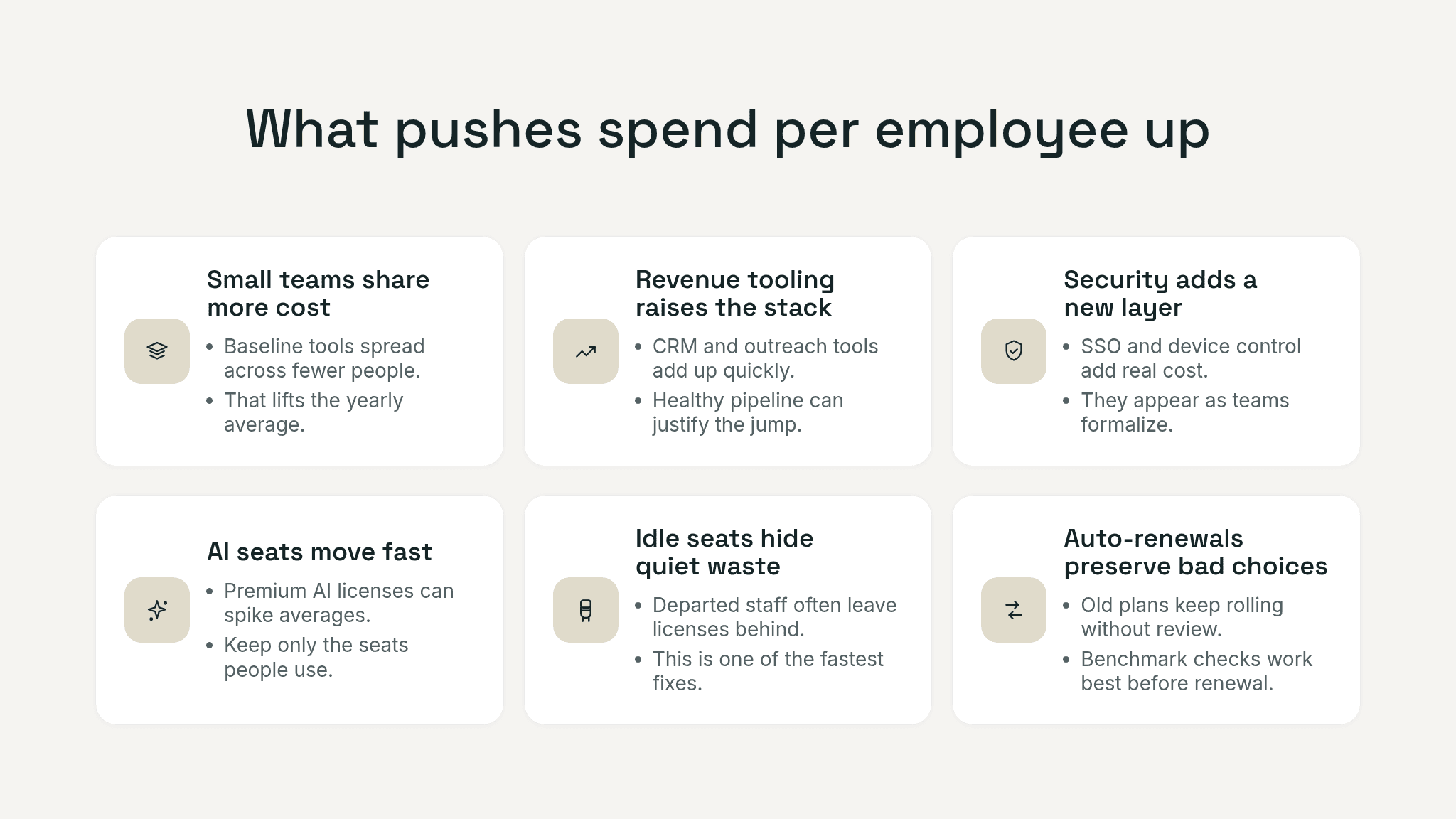
One useful extra benchmark is SaaS as a share of operating expenses. Startup budget guides such as culta.ai’s stage-based SaaS spending breakdown put healthy ranges around 8 to 15 percent of OpEx at pre-seed, 6 to 12 percent at seed, and 5 to 10 percent around Series A. Those are not hard rules, but they are a strong sniff test. If your SaaS line is creeping above those ranges and your per-employee spend is already high, you probably have cleanup work to do.

Operating-grid graphic showing six factors that push SaaS spend per employee up, including shared tools, revenue tooling, security, AI add-ons, idle seats, and renewals.

Pro tip: if your spend looks heavy, do not start by slashing categories. Start by asking which tools have a clear owner, which ones were used in the last 30 days, and which contracts renew in the next 90. That sequence usually surfaces easier savings than a top-down “cut 20 percent” order.

How to check if your startup is overpaying

You do not need a finance team or a six-week audit to get an answer. You need one decent pass through the stack.

Start with a simple calculation:

total annual SaaS spend / total full-time employees = spend per employee

Then layer on context.

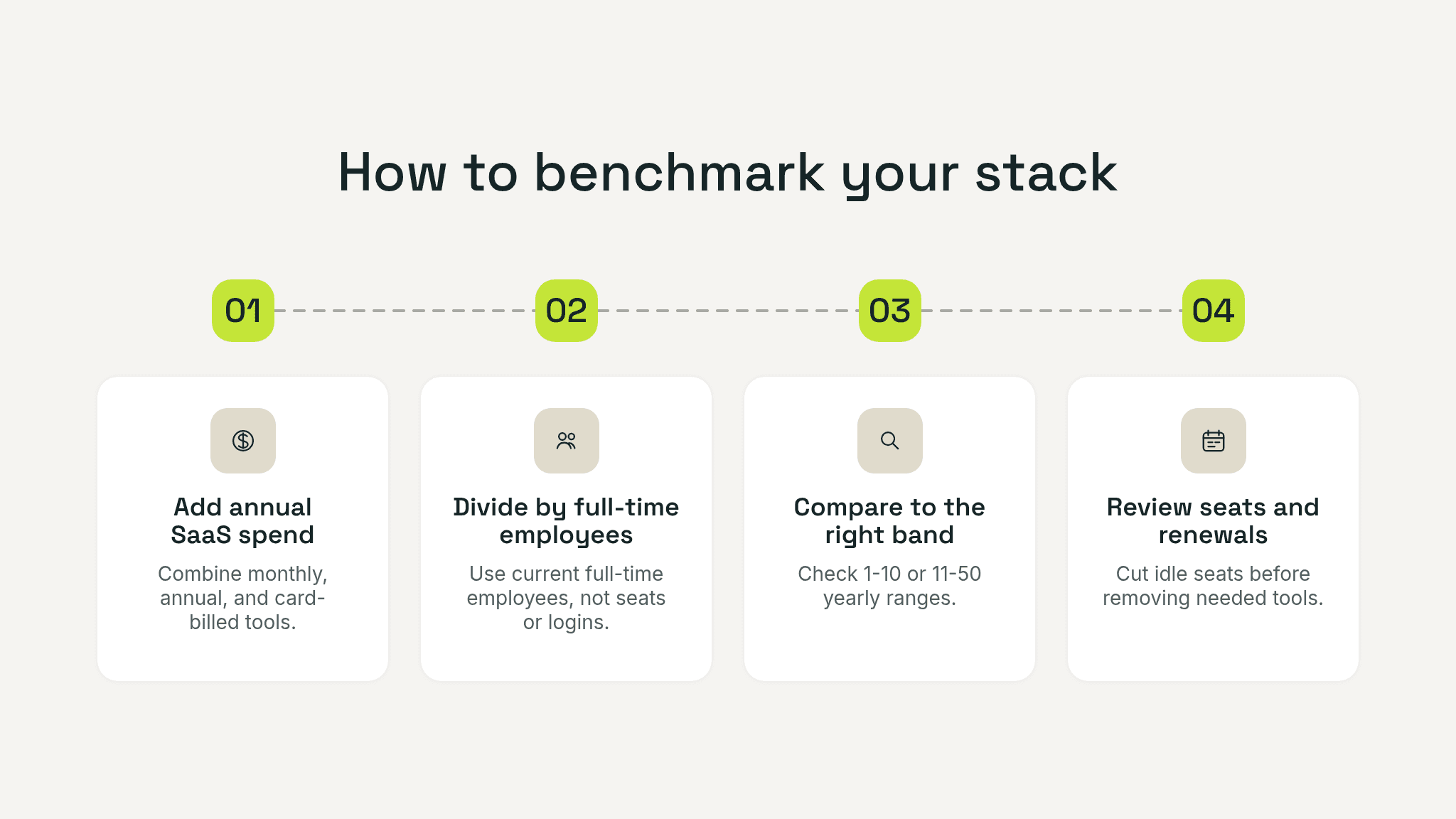
Four-step benchmarking graphic showing total SaaS spend, divide by headcount, compare to the right size band, and review seats and renewals.

1. Compare against your size band

Do not compare a seven-person startup against enterprise-heavy benchmark reports. Compare it against small-team norms first. If you are in the 1 to 10 range, some per-employee inflation is expected. If you are in the 11 to 50 range, you should start seeing more efficiency.

2. Break spend by category

List your top categories: collaboration, sales, finance, security, support, analytics, engineering, and AI. You are not looking for precision down to the cent. You are looking for where cost concentration lives.

3. Check ownership

Every recurring tool should have one named owner. If a subscription has no owner, it is already on the shortlist for review.

4. Check seat usage

Many companies carry inactive seats, spare licenses kept “just in case,” or premium tiers that only one person needs.

5. Check renewal timing

A stack with decent prices can still be inefficient if renewals auto-roll without negotiation. The closer your spend gets to benchmark ceilings, the more renewal discipline matters.

6. Separate productive spend from messy spend

Some tools are expensive and worth it. Others are cheap and still wasteful. Overpaying is not just about price. It is about weak return and weak control.

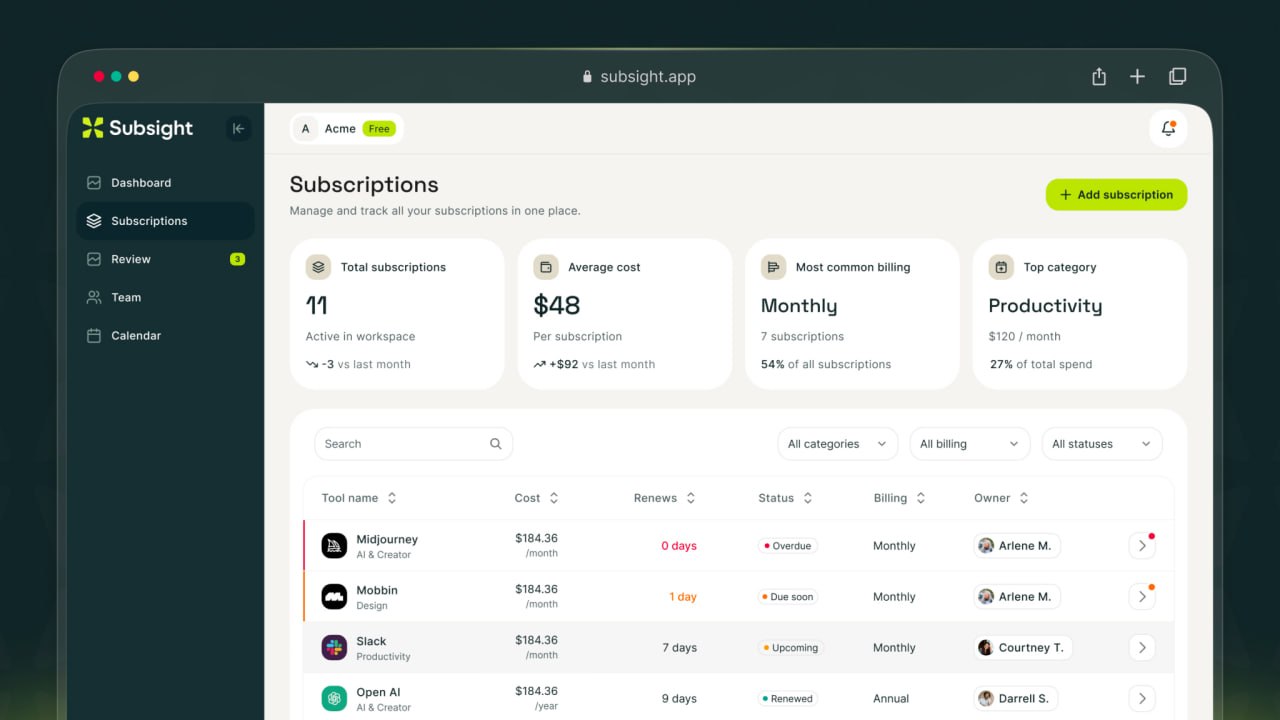
Subsight subscription list showing tool costs, owners, billing cycles, and renewal dates.

If you want a lightweight way to operationalize this, pair the benchmark check with a simple SaaS inventory and renewal review. Subsight’s own content on hidden monthly subscriptions, SaaS cost audits, subscription tracker selection, and spend management software maps well to the next step once the benchmark tells you there may be a problem.

When high SaaS spend is healthy and when it is waste

High spend is healthy when it buys leverage.

If your tools let a small team close more revenue, automate grunt work, onboard customers faster, or avoid expensive operational mistakes, a higher per-employee number can be smart. Founders sometimes underinvest in software because they obsess over line items and ignore time cost. One strong tool that removes hours of weekly admin is often cheaper than the hidden salary cost of manual work.

High spend becomes waste when the stack grows faster than decisions.

That usually looks like:

  • cost without ownership

  • tools without adoption

  • renewals without review

  • expansion without consolidation

  • premium pricing without a clear use case

One useful extra benchmark is SaaS as a share of operating expenses. Startup budget guides such as culta.ai’s stage-based SaaS spending breakdown put healthy ranges around 8 to 15 percent of OpEx at pre-seed, 6 to 12 percent at seed, and 5 to 10 percent around Series A. Those are not hard rules, but they are a strong sniff test. If your SaaS line is creeping above those ranges and your per-employee spend is already high, you probably have cleanup work to do.

Operating-grid graphic showing six factors that push SaaS spend per employee up, including shared tools, revenue tooling, security, AI add-ons, idle seats, and renewals.

Pro tip: if your spend looks heavy, do not start by slashing categories. Start by asking which tools have a clear owner, which ones were used in the last 30 days, and which contracts renew in the next 90. That sequence usually surfaces easier savings than a top-down “cut 20 percent” order.

How to check if your startup is overpaying

You do not need a finance team or a six-week audit to get an answer. You need one decent pass through the stack.

Start with a simple calculation:

total annual SaaS spend / total full-time employees = spend per employee

Then layer on context.

Four-step benchmarking graphic showing total SaaS spend, divide by headcount, compare to the right size band, and review seats and renewals.

1. Compare against your size band

Do not compare a seven-person startup against enterprise-heavy benchmark reports. Compare it against small-team norms first. If you are in the 1 to 10 range, some per-employee inflation is expected. If you are in the 11 to 50 range, you should start seeing more efficiency.

2. Break spend by category

List your top categories: collaboration, sales, finance, security, support, analytics, engineering, and AI. You are not looking for precision down to the cent. You are looking for where cost concentration lives.

3. Check ownership

Every recurring tool should have one named owner. If a subscription has no owner, it is already on the shortlist for review.

4. Check seat usage

Many companies carry inactive seats, spare licenses kept “just in case,” or premium tiers that only one person needs.

5. Check renewal timing

A stack with decent prices can still be inefficient if renewals auto-roll without negotiation. The closer your spend gets to benchmark ceilings, the more renewal discipline matters.

6. Separate productive spend from messy spend

Some tools are expensive and worth it. Others are cheap and still wasteful. Overpaying is not just about price. It is about weak return and weak control.

Subsight subscription list showing tool costs, owners, billing cycles, and renewal dates.

If you want a lightweight way to operationalize this, pair the benchmark check with a simple SaaS inventory and renewal review. Subsight’s own content on hidden monthly subscriptions, SaaS cost audits, subscription tracker selection, and spend management software maps well to the next step once the benchmark tells you there may be a problem.

Pro Tip: Run the benchmark twice: once on your full annual SaaS spend, and once on only the contracts renewing in the next 90 days. The second cut shows where a heavy stack is about to lock itself in again, which is usually where the fastest practical savings sit.

Use the benchmark to ask better questions

A five-person startup can look expensive and still be fine. A thirty-person startup can sit near the average and still waste a meaningful amount of money. The benchmark matters because it forces better questions. Are we paying for leverage or drift? Did this stack grow intentionally, or did it just happen?

If you can answer those questions clearly, you are probably not overpaying. If you cannot, the benchmark is doing its job by telling you where to look next.

Take control of your SaaS stack

Stop guessing. Know exactly what you’re paying for and who owns it.

Join 100+ founders in line

Frequently asked questions

What is the average SaaS spend per employee?

How much should a 10-person startup spend on software?

Why do very small teams pay more per employee?

What is a red flag that we are overpaying?

Should we cut tools if our benchmark looks high?

No headings found in content area

Find hidden SaaS subscriptions

Track every tool, owner, and renewal in one place. No spreadsheets. No surprise renewals.

Join 100+ founders in line

Professional portrait of Petras Nargela, Founder of Subsight, against a neutral background.

Petras Nargela

Petras is the Founder of Subsight and a veteran entrepreneur with over 10+ years of experience building and scaling digital ventures. Over the past decade, he has co-founded several successful companies that generate 7-figure annual revenue, including a Shopify app studio and a digital agency. Having managed the complex financial stacks of multiple high-growth businesses, he built Subsight to solve the "SaaS leakage" problem he experienced firsthand. He now helps B2B teams turn software chaos into a strategic, automated advantage.
Get started

Affordable subscription tracking for teams

Track, manage, and cancel subscriptions in minutes. Join the waitlist today to secure 40% off your first 3 months.

Get started

Affordable subscription tracking for teams

Track, manage, and cancel subscriptions in minutes. Join the waitlist today to secure 40% off your first 3 months.

Get started

Affordable subscription tracking for teams

Track, manage, and cancel subscriptions in minutes. Join the waitlist today to secure 40% off your first 3 months.