Finance tips

The Founder's Guide to SaaS Budgeting: From Pre-Seed to Series A

A practical SaaS budgeting guide for founders from pre-seed to Series A. Track each tool, owner, contract, renewal, and growth driver so software costs stay aligned with hiring and burn rate.

8 min. read

SaaS budgeting by growth stage, from pre-seed to Series A.
No headings found in content area

TL;DR

  • Budget by tool, not only by month.
    Track each subscription with an owner, purpose, billing term, renewal timing, and monthly equivalent cost.

  • Use different rules at each growth stage.
    Pre-seed teams need flexibility, seed teams need hiring-linked planning, and Series A teams need tighter renewal and burn-rate control.

  • Separate core tools from optional spend.
    That makes it easier to see which subscriptions protect execution and which ones can pause if plans change.

  • Review the budget as an operating system.
    Monthly payment tracking, renewal reminders, and owner check-ins matter as much as the original budget itself.
SaaS budgets usually break for a simple reason: most startup plans track software by month, while the real commitments sit at the tool level. A founder may know the company spent $7,000 on software last month, but still miss that three tools renew next quarter or that a "temporary" app has quietly become a fixed cost.

Why startup SaaS budgets fail when they are tracked by month alone

Monthly totals are useful, but they flatten the details that actually drive software spend. A single line called "software" does not tell you which tools are annual, which ones scale with headcount, or which subscriptions are still tied to an old experiment.

That is why a SaaS budget template for startups needs more than a list of recurring payments. It should show the tool, the team using it, the contract shape, the renewal timing, and the decision behind the spend. When the budget is structured this way, founders can forecast more realistically and make trade-offs earlier, instead of treating software as a vague line item inside broader spend management software conversations.

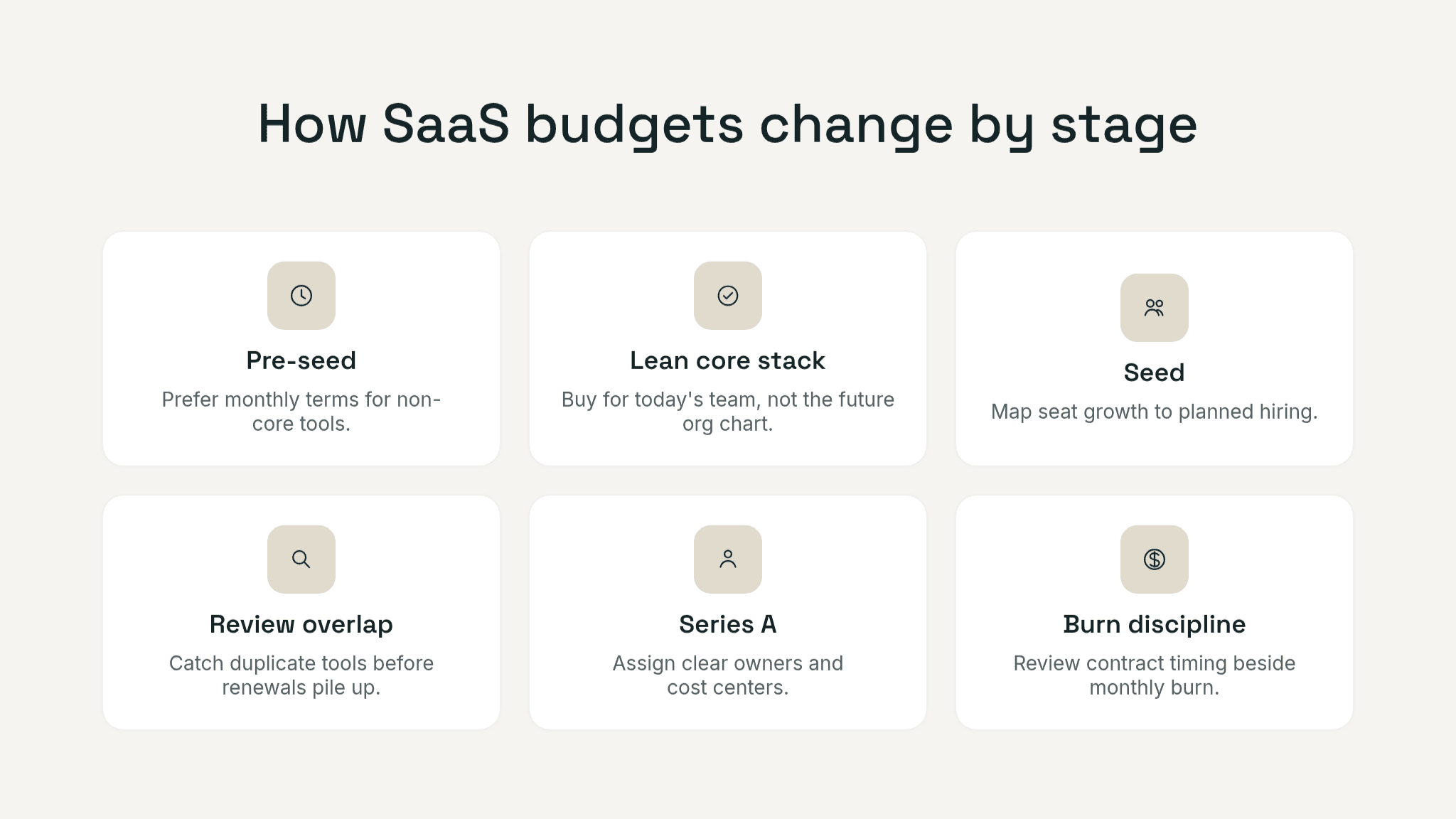
Signals grid showing how SaaS budgeting changes by stage: pre-seed favors flexible monthly terms and a lean core stack, seed ties tool growth to hiring and overlap reviews, and Series A adds owner, cost-center, and burn discipline.

What are the 4 types of cost in a startup?

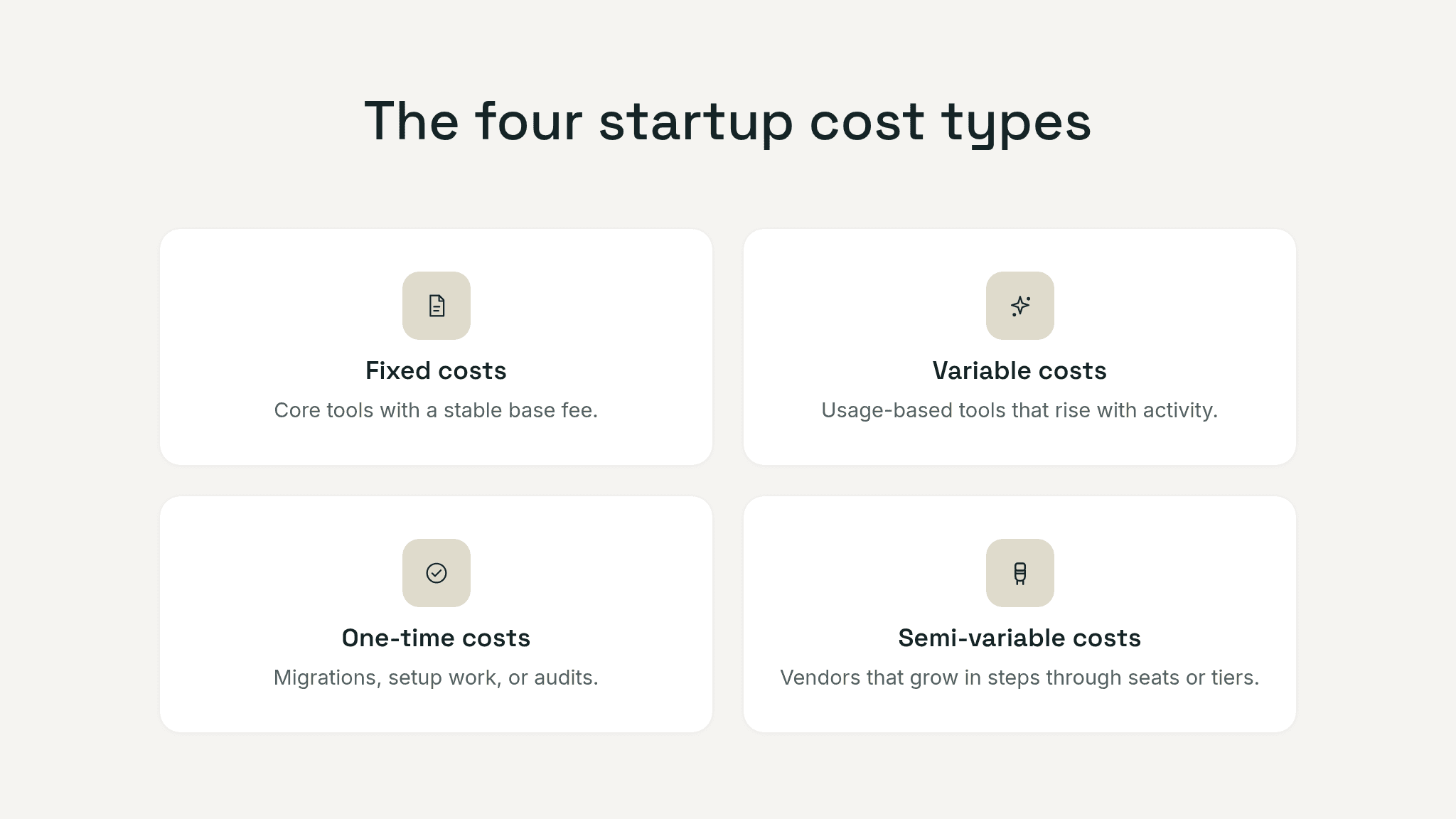
Most startup budgets become easier to manage when costs are split into four types: fixed, variable, one-time, and semi-variable.

Fixed costs stay relatively stable in the short term, such as payroll software or a core project-management plan.

Variable costs rise or fall with usage, like cloud infrastructure or tools priced by ticket volume or credits.

One-time costs are non-recurring purchases such as migrations, implementation work, or a security review.

Semi-variable costs sit in the middle. Many SaaS tools behave this way because the vendor stays the same while seat count, feature tier, or add-ons change as the company grows.

For budgeting, this four-part view is useful because it helps founders decide what belongs in the base operating plan and what should scale only when a hiring or revenue milestone is reached.

Four-card budgeting graphic showing fixed costs, variable costs, one-time costs, and semi-variable costs, with short examples for each category.

Pre-seed SaaS budgeting: buy for speed, protect flexibility

At pre-seed, the goal is to help a very small team move fast without locking the company into costs that are hard to unwind. That means your budget should favor monthly terms where possible, especially for non-core tools, while still keeping a realistic 12- to 18-month cash forecast.

A strong pre-seed software budget usually has three layers:

  • core operating tools the company needs to function every week

  • role-specific tools tied to the current team, not the future org chart

  • optional or experimental tools that should be reviewed quickly

If a tool belongs to the third group, mark it clearly in the budget as optional rather than letting it blend into the baseline. For pre-seed teams, that one distinction makes later cuts much easier. If the stack already feels messy, a fast SaaS cost audit usually shows which tools are genuinely core and which ones only survived because nobody reviewed them.

SaaS budgets usually break for a simple reason: most startup plans track software by month, while the real commitments sit at the tool level. A founder may know the company spent $7,000 on software last month, but still miss that three tools renew next quarter or that a "temporary" app has quietly become a fixed cost.

Why startup SaaS budgets fail when they are tracked by month alone

Monthly totals are useful, but they flatten the details that actually drive software spend. A single line called "software" does not tell you which tools are annual, which ones scale with headcount, or which subscriptions are still tied to an old experiment.

That is why a SaaS budget template for startups needs more than a list of recurring payments. It should show the tool, the team using it, the contract shape, the renewal timing, and the decision behind the spend. When the budget is structured this way, founders can forecast more realistically and make trade-offs earlier, instead of treating software as a vague line item inside broader spend management software conversations.

Signals grid showing how SaaS budgeting changes by stage: pre-seed favors flexible monthly terms and a lean core stack, seed ties tool growth to hiring and overlap reviews, and Series A adds owner, cost-center, and burn discipline.

What are the 4 types of cost in a startup?

Most startup budgets become easier to manage when costs are split into four types: fixed, variable, one-time, and semi-variable.

Fixed costs stay relatively stable in the short term, such as payroll software or a core project-management plan.

Variable costs rise or fall with usage, like cloud infrastructure or tools priced by ticket volume or credits.

One-time costs are non-recurring purchases such as migrations, implementation work, or a security review.

Semi-variable costs sit in the middle. Many SaaS tools behave this way because the vendor stays the same while seat count, feature tier, or add-ons change as the company grows.

For budgeting, this four-part view is useful because it helps founders decide what belongs in the base operating plan and what should scale only when a hiring or revenue milestone is reached.

Four-card budgeting graphic showing fixed costs, variable costs, one-time costs, and semi-variable costs, with short examples for each category.

Pre-seed SaaS budgeting: buy for speed, protect flexibility

At pre-seed, the goal is to help a very small team move fast without locking the company into costs that are hard to unwind. That means your budget should favor monthly terms where possible, especially for non-core tools, while still keeping a realistic 12- to 18-month cash forecast.

A strong pre-seed software budget usually has three layers:

  • core operating tools the company needs to function every week

  • role-specific tools tied to the current team, not the future org chart

  • optional or experimental tools that should be reviewed quickly

If a tool belongs to the third group, mark it clearly in the budget as optional rather than letting it blend into the baseline. For pre-seed teams, that one distinction makes later cuts much easier. If the stack already feels messy, a fast SaaS cost audit usually shows which tools are genuinely core and which ones only survived because nobody reviewed them.

Track your SaaS spend

Get full visibility into subscriptions, owners, and upcoming renewals.

Join 100+ founders in line

Seed-stage SaaS budgeting: connect the tool plan to the hiring plan

Seed-stage budgets usually break when software planning stays static while the team plan changes every quarter. A tool that looked efficient for eight people can become a surprise cost for fifteen once new seats and add-ons stack up.

This is where the budget should become more dynamic. Instead of recording only today's price, track the driver behind the spend:

  • seat-based tools should show expected headcount growth

  • usage-based tools should show the activity metric that makes them grow

  • team-specific tools should show the function that owns them

That structure turns tool growth into something you can model, not just react to.

Hypothetical example

A hypothetical seed-stage company with 14 people might budget a CRM, support desk, product analytics tool, payroll system, design platform, and collaboration stack. If the team plans to hire three sales roles and two customer-success roles over the next two quarters, the budget should not wait until those hires land. It should already show which subscriptions will add seats, what the next pricing threshold looks like, and whether any annual renewal hits before the hiring plan is fully confirmed.

The logic matters more than the exact tool list: connect software spend to the operating plan, not just to last month's invoice.

Series A SaaS budgeting: manage software against burn discipline

By Series A, the company usually has enough tooling and headcount that a founder cannot rely on memory and a few invoices to understand software cost exposure.

This is where the SaaS budget becomes part of operating control. Each subscription should have:

  • a named owner

  • a category or cost center

  • a clear purpose

  • contract timing

  • a monthly equivalent cost

  • a keep, review, or replace posture

That level of detail matters because series A burn rate conversations are rarely only about payroll. Software costs may be smaller than headcount, but they are easier to ignore because they are fragmented. This is also the stage where SaaS spending benchmarks become more useful as a sense check, even if they should never replace your own hiring plan and contract review.

The budget should also distinguish between committed spend and expandable spend. A committed annual contract needs a different conversation from a monthly tool that can be paused next month. Review that split alongside gross burn, net burn, and runway so software is judged in the same operating context as headcount and go-to-market spend.

Still tracking this manually?

Subsight automatically maps your tools, owners, and renewal timelines in one place.
Join 100+ founders in line

How to build a SaaS budget template for startups

The most useful template is simple enough to update every month and detailed enough to support real decisions. That usually means one row per tool, not one row per month.

Use the template to answer five questions fast:

  • what are we paying for?

  • who owns it?

  • what is it for?

  • what makes this cost grow?

  • when do we need to review it again?

The core structure below works in both Excel and Notion and supports software budget planning without turning the file into finance theater.

Template field

What to record

Why it matters

Stage

Pre-seed, seed, or Series A

Keeps budget expectations aligned with growth stage

Category

Collaboration, engineering, finance, sales, support, security, and so on

Makes category-level review possible

Tool name

Vendor or product name

Gives each subscription a stable line item

Owner

One responsible person

Prevents orphaned renewals and vague accountability

Purpose

Short description of the job the tool does

Helps confirm whether the spend is still justified

Billing frequency

Monthly, annual, quarterly, or usage-based

Shows how flexible the cost really is

Unit price

Price per seat, workspace, or contract

Lets you compare plans consistently

Paid seats

Number of seats you are paying for

Exposes idle licensing quickly

Monthly equivalent

Annual or quarterly cost converted to a monthly view

Makes cross-tool comparison easier

Annualized cost

Monthly view rolled up for planning

Helps connect tool spend to runway and burn

Renewal date

Next renewal date

Shows when a decision is coming

Notice deadline

Last date to cancel or give notice

Protects the real decision window

Committed vs optional

Core, committed, experimental, or optional

Makes prioritization easier if plans tighten

Linked driver

Hiring plan, usage metric, or project milestone

Explains what makes the spend rise

Notes

Export needs, dependencies, or downgrade options

Prevents rushed decisions later

If a column will never affect a decision, remove it. If a missing column keeps causing review mistakes, add it.

How to keep track of monthly payments?

Tracking monthly payments gets easier when you stop treating it as a bookkeeping-only task. The practical system is:

  • one master subscription register

  • one owner per tool

  • one payment-method field

  • one place for invoice or contract records

  • one monthly review rhythm

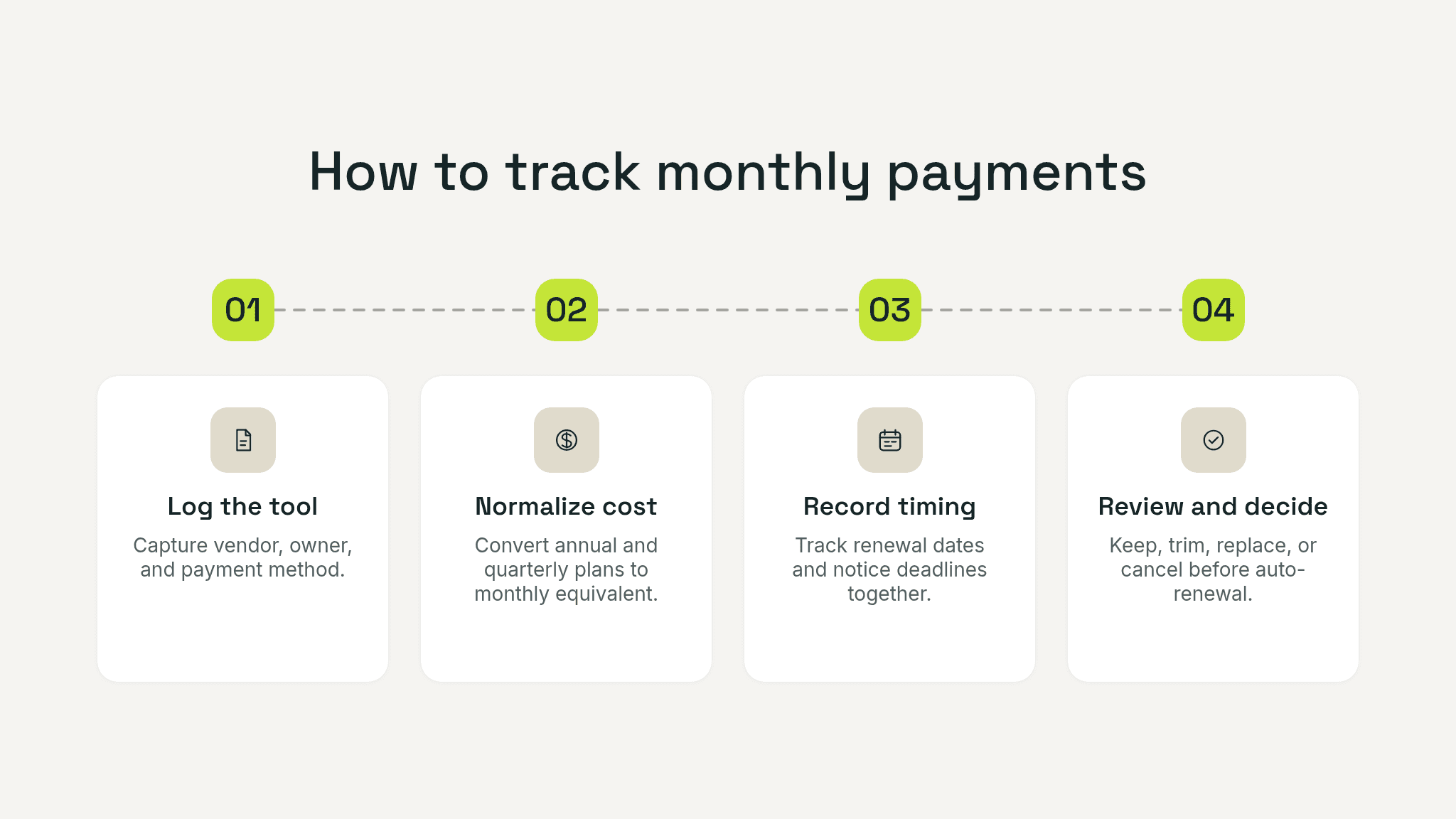
Numbered four-step workflow for tracking SaaS payments: log the tool, normalize the cost, record renewal and notice dates, and review the next decision.

That means every subscription should show where it is billed, how it is paid, when it renews, and who confirms continued use. Once the company grows past a lightweight spreadsheet, this is usually the point where teams start looking for stronger SaaS cost control for startups instead of relying on manual cleanup forever.

A good monthly review takes about 30 minutes. Reconcile new charges, confirm unexpected changes, check upcoming renewals, and review tools that look underused or duplicated. Low usage on its own is not enough to cancel something. Always confirm the tool's purpose with its owner first.

Before cutting a subscription, check dependencies, exports, admin access, and occasional high-value use.

How to build a SaaS budget template for startups

The most useful template is simple enough to update every month and detailed enough to support real decisions. That usually means one row per tool, not one row per month.

Use the template to answer five questions fast:

  • what are we paying for?

  • who owns it?

  • what is it for?

  • what makes this cost grow?

  • when do we need to review it again?

The core structure below works in both Excel and Notion and supports software budget planning without turning the file into finance theater.

Template field

What to record

Why it matters

Stage

Pre-seed, seed, or Series A

Keeps budget expectations aligned with growth stage

Category

Collaboration, engineering, finance, sales, support, security, and so on

Makes category-level review possible

Tool name

Vendor or product name

Gives each subscription a stable line item

Owner

One responsible person

Prevents orphaned renewals and vague accountability

Purpose

Short description of the job the tool does

Helps confirm whether the spend is still justified

Billing frequency

Monthly, annual, quarterly, or usage-based

Shows how flexible the cost really is

Unit price

Price per seat, workspace, or contract

Lets you compare plans consistently

Paid seats

Number of seats you are paying for

Exposes idle licensing quickly

Monthly equivalent

Annual or quarterly cost converted to a monthly view

Makes cross-tool comparison easier

Annualized cost

Monthly view rolled up for planning

Helps connect tool spend to runway and burn

Renewal date

Next renewal date

Shows when a decision is coming

Notice deadline

Last date to cancel or give notice

Protects the real decision window

Committed vs optional

Core, committed, experimental, or optional

Makes prioritization easier if plans tighten

Linked driver

Hiring plan, usage metric, or project milestone

Explains what makes the spend rise

Notes

Export needs, dependencies, or downgrade options

Prevents rushed decisions later

If a column will never affect a decision, remove it. If a missing column keeps causing review mistakes, add it.

How to keep track of monthly payments?

Tracking monthly payments gets easier when you stop treating it as a bookkeeping-only task. The practical system is:

  • one master subscription register

  • one owner per tool

  • one payment-method field

  • one place for invoice or contract records

  • one monthly review rhythm

Numbered four-step workflow for tracking SaaS payments: log the tool, normalize the cost, record renewal and notice dates, and review the next decision.

That means every subscription should show where it is billed, how it is paid, when it renews, and who confirms continued use. Once the company grows past a lightweight spreadsheet, this is usually the point where teams start looking for stronger SaaS cost control for startups instead of relying on manual cleanup forever.

A good monthly review takes about 30 minutes. Reconcile new charges, confirm unexpected changes, check upcoming renewals, and review tools that look underused or duplicated. Low usage on its own is not enough to cancel something. Always confirm the tool's purpose with its owner first.

Before cutting a subscription, check dependencies, exports, admin access, and occasional high-value use.

Pro Tip: Add one extra field to the template called "next decision date." Renewal timing tells you when the vendor acts. A decision date tells your team when to revisit the tool on purpose, before the contract forces the conversation.

Build a budget that scales with the company

The best startup software budget is not the most detailed one. It is the one that lets the team see which tools are essential, which costs will grow with hiring, and which renewals need attention before they become automatic. If you budget by tool, owner, contract shape, and growth driver instead of by month alone, the file becomes more useful for real operating decisions from pre-seed through Series A.

Editor's note: This article's burn-rate and runway framing was informed by JPMorgan Chase, "Startup Runway: Reducing Cash Burn & Extending Your Runway," and Slash, "Financial Forecasting for Startups: Best Practices."

Take control of your SaaS stack

Stop guessing. Know exactly what you’re paying for and who owns it.

Join 100+ founders in line

Frequently asked questions

What should a SaaS budget template for startups include?

How is startup expense forecasting different from ordinary budgeting?

Should pre-seed teams sign annual SaaS contracts?

How does software budget planning connect to burn rate?

What is the easiest way to keep track of monthly payments?

No headings found in content area

Find hidden SaaS subscriptions

Track every tool, owner, and renewal in one place. No spreadsheets. No surprise renewals.

Join 100+ founders in line

Professional portrait of Petras Nargela, Founder of Subsight, against a neutral background.

Petras Nargela

Petras is the Founder of Subsight and a veteran entrepreneur with over 10+ years of experience building and scaling digital ventures. Over the past decade, he has co-founded several successful companies that generate 7-figure annual revenue, including a Shopify app studio and a digital agency. Having managed the complex financial stacks of multiple high-growth businesses, he built Subsight to solve the "SaaS leakage" problem he experienced firsthand. He now helps B2B teams turn software chaos into a strategic, automated advantage.
Get started

Affordable subscription tracking for teams

Track, manage, and cancel subscriptions in minutes. Join the waitlist today to secure 40% off your first 3 months.

Get started

Affordable subscription tracking for teams

Track, manage, and cancel subscriptions in minutes. Join the waitlist today to secure 40% off your first 3 months.

Get started

Affordable subscription tracking for teams

Track, manage, and cancel subscriptions in minutes. Join the waitlist today to secure 40% off your first 3 months.