
Search for articles


Upgrading Your Workspace
As your organization grows, you may need to track more tools or add more team members than the Free tier allows. You can upgrade your workspace at any time to access higher limits and advanced automation features.

Written by Petras Nargela
Written by Petras Nargela

Last updated on
1. Choosing Your New Plan
Subsight offers two paid tiers to support growing teams:
Pro Plan: Best for growing teams needing full control of costs. This plan increases your capacity to 20 users and 20 subscriptions and unlocks Slack reminders and the Smart spreadsheet importer.
Business Plan: Tailored for large teams with complex stacks. This tier offers unlimited users and unlimited subscriptions, plus advanced tools like Multi-currency support and a Bank statement parser.
2. How to Upgrade
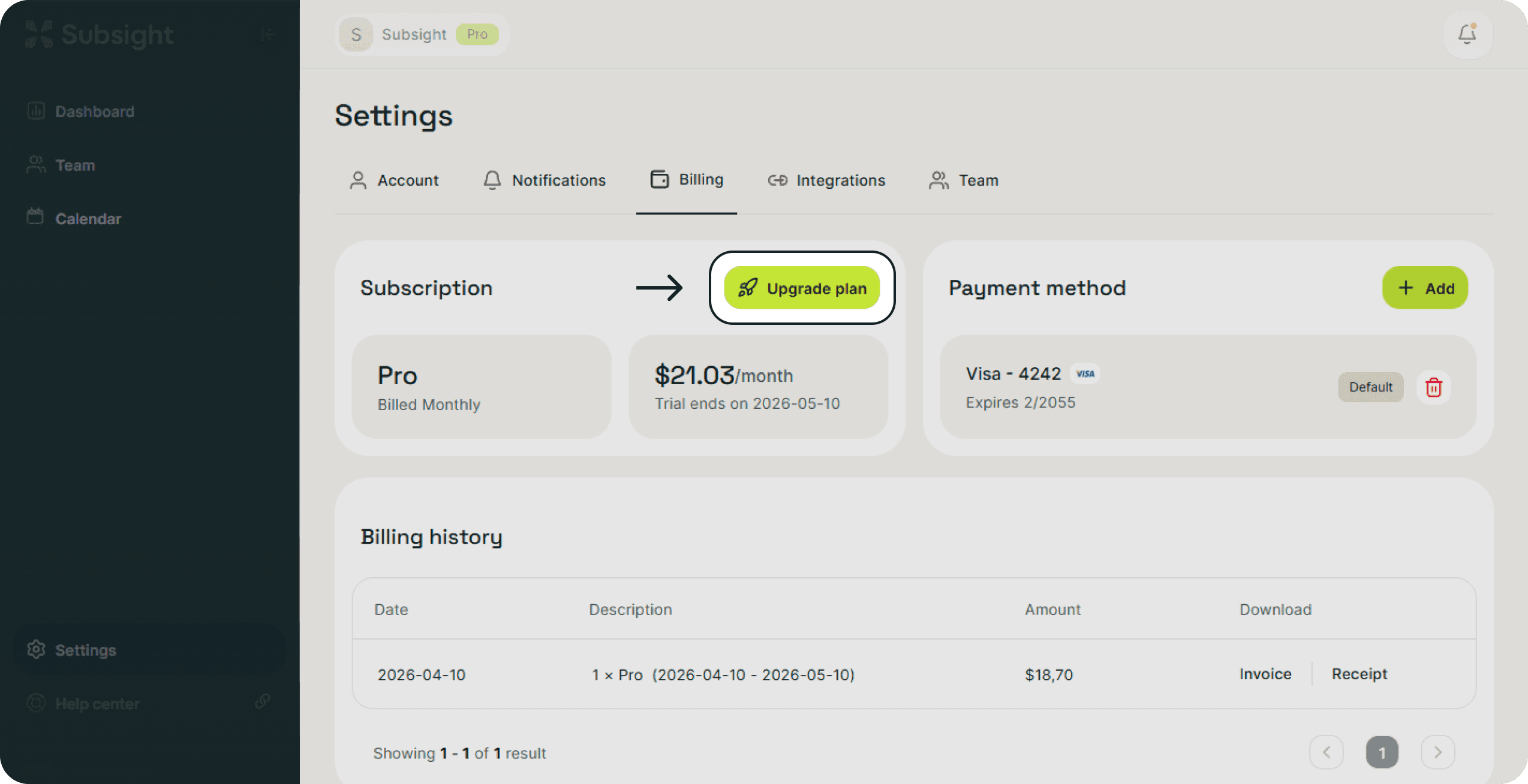
Navigate to Settings in the bottom-left sidebar.
Click on the Billing tab at the top of the page.
Click the Upgrade plan button to view available tiers.
Select your preferred plan and choose between Monthly or Yearly billing.
Choosing Yearly billing includes a 25% discount compared to monthly rates.
3. Managing Plan Transitions
Instant Access: Once you confirm your upgrade, your new limits and features are available immediately.
Exceeding Limits: If you exceed the subscription limit of your current plan, Subsight will notify you to upgrade to the next tier. Your data remains safe and accessible throughout this transition.
Free Trial: You can test all Pro or Business features for 7 days with no credit card required. If you do not choose a paid plan after the trial ends, your account will automatically move to the Free tier.
1. Choosing Your New Plan
Subsight offers two paid tiers to support growing teams:
Pro Plan: Best for growing teams needing full control of costs. This plan increases your capacity to 20 users and 20 subscriptions and unlocks Slack reminders and the Smart spreadsheet importer.
Business Plan: Tailored for large teams with complex stacks. This tier offers unlimited users and unlimited subscriptions, plus advanced tools like Multi-currency support and a Bank statement parser.
2. How to Upgrade
Navigate to Settings in the bottom-left sidebar.
Click on the Billing tab at the top of the page.
Click the Upgrade plan button to view available tiers.
Select your preferred plan and choose between Monthly or Yearly billing.
Choosing Yearly billing includes a 25% discount compared to monthly rates.
3. Managing Plan Transitions
Instant Access: Once you confirm your upgrade, your new limits and features are available immediately.
Exceeding Limits: If you exceed the subscription limit of your current plan, Subsight will notify you to upgrade to the next tier. Your data remains safe and accessible throughout this transition.
Free Trial: You can test all Pro or Business features for 7 days with no credit card required. If you do not choose a paid plan after the trial ends, your account will automatically move to the Free tier.


